Autopilot finds roles that fit you, applies on Goodspace, fills company application forms through the Chrome extension and reaches the person hiring. Anything that spends a credit, reaches a person or submits a form waits for you.
Five steps. You set the first one up once, and Autopilot asks for you only when it needs you.
01
Tell it what you are after, once
Roles, cities, work mode, the salary floor and how many a day. Two minutes. Autopilot searches against that every day, not against a keyword you typed last week.
02
It finds the roles
Goodspace jobs and roles on company career sites, ranked against your resume and your settings. You tick the ones worth applying to.
Goodspace jobsCompany career sites
03
It applies for you
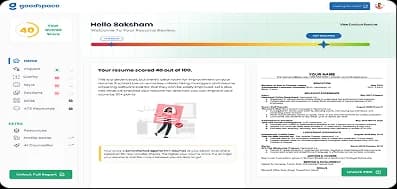
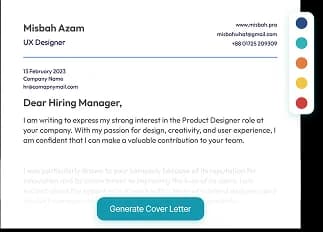
Goodspace roles are applied to on your pick. For the people hiring, it scans your resume against the description and writes a tailored resume and cover letter for that role.
04Chrome extension
The extension fills the company forms
The Goodspace Chrome extension opens each company's own application form and fills it from your profile and answer bank, with your resume attached. You check it and press Confirm and submit.
The recruiter or hiring manager behind the posting, and a first email to them drafted in your voice. Gold. Unlocking the contact and sending the email each wait for your approval.
How the agent works
What it does on its own, and what it never does alone
Gold runs on Auto. Even on Auto, anything that spends a credit, reaches a person or submits a form waits for your approval. A free run makes documents only (track the job, ATS scan, tailor the resume (watermarked), check the match and write the cover letter), up to 2 a day, and never reaches anyone.
YouSet it up once
LumiPlans and runs each step
Goodspace jobsApplied to on your pick
Company career sitesRanked against your resume
ApplicationsTailored resume and cover letter
Company formsFilled by the Chrome extension
4Submit the company form
Hiring contactA named recruiter or hiring manager
1Unlock the profile2Unlock the email3Send the email
Runs on its ownWaits for your OK
Ask for an outcome, not an answer
Autopilot is a conversation with Lumi. Say what you want to happen, in a sentence.
Sending one resume to hundreds of postings is fast and easy to ignore. Autopilot does fewer applications, properly.
Bulk auto-applySame resume, 100 postings
Cover letterDear Priya,
Tailored for Northwind LabsRohan VermaSenior Product ManagerExperience
Led checkout redesign, UPI success up from 91% to 97%
Owned the Payments roadmap for merchant onboarding
Built SQL dashboards for settlement failures
Shipped instant payouts across 2M monthly orders
To Priya, Hiring Manager · Northwind LabsYou approved
Goodspace AutopilotOne application, made for the role
What gets sent: One resume for all versus Tailored per role
Who it reaches: Just the form versus A named person
What you see first: A count versus Every draft
What fills the form: Same answers versus Your answer bank
Who decides to send: The tool versus You
Free to start, Gold to go further
Free within daily limits. Gold raises them.
Free Plan
5 roles a day
3 forms a day
2 document runs a day
No hiring contacts
No email outreach
No WhatsApp updates
Answers written for you
Lumi 2.1
Best Value
Gold
60 roles a day
20 forms a day
Unlimited runs a day
Hiring contact found
Email sent from your Gmail
WhatsApp approvals
Answers written for you
Lumi 5.0
Matched roles a day
Company forms filled a day
Application runs a day
Finding and unlocking the recruiter or hiring manager
Email to them, drafted and sent from your Gmail
Approvals and updates on WhatsApp
Answers written where a form asks
Lumi
Free Plan
5
3
2, documents only
-
-
-
Included
Lumi 2.1
Best Value
Gold
60
20
Unlimited
Included
Included
Included
Included
Lumi 5.0
See Gold plans₹943 for the first month with UPI, then ₹1,179/month (incl. GST). ₹1,179 on card. Cancel anytime.
What is an AI job application agent?
An AI job application agent is software that carries out the steps of applying for a job, rather than advising you on them. A chatbot tells you how to tailor a resume. An agent tailors it, scans it against the description, fills the company's form, writes the cover letter and lines up the person to send it to, then shows you the result.
The difference that matters is where it stops. An agent that sends on your behalf without showing you is a risk to your name with every recruiter it reaches. Autopilot runs the application work unattended and holds at 4 points: unlock the profile, unlock the email, send the email and submit the company form. Those wait for you, at every setting.
It also differs from auto-apply tools that fill in forms in bulk. Volume is not the constraint in most searches, relevance is. A tailored application to a role that fits, sent to a named person, does more than a hundred identical ones, which is why Autopilot works to a daily cap you set instead of a target count.
Set it up once. Check it when it asks.
Two minutes of settings, then Autopilot works through your roles each day and tells you when a step needs you, on WhatsApp with Gold.
If you have any further questions, please don't hesitate to reach out to our support team for assistance.
Yes. Goodspace Autopilot is an AI agent that does the work of applying rather than advising on it. It finds roles that match your titles, cities and salary, applies directly to the ones posted on Goodspace, and for roles on company career sites it scans your resume against the description, tailors the resume, writes the cover letter, finds the recruiter or hiring manager and drafts the email to them. Anything that spends a credit or reaches a person waits for your approval. It is free to use within daily limits (5 matched roles, 3 company forms and 2 document-only runs a day, each run a tracked job, ATS scan, watermarked tailored resume, match check and cover letter; on a company form it fills in your resume and answers and you press Submit). The free plan sends no email and no WhatsApp. Goodspace Gold raises the limits to 60 roles and 20 company forms a day with unlimited runs, and adds finding and unlocking the recruiter or hiring manager, the email drafted and sent from your Gmail, Lumi 5.0 and WhatsApp updates.
Set up Autopilot once with the roles, locations, work mode and salary floor you want, and choose the resume it should work from. Ask it to find roles, tick the ones worth applying to and confirm. Goodspace roles are applied to on that press. For roles on company sites it writes the tailored resume and cover letter, finds who to contact and drafts the email, then asks you to approve each unlock and the send. Connecting Gmail lets the email go from your own address.
It depends on what the tool sends. Bulk auto-apply that submits one resume to hundreds of postings produces volume, and recruiters filter identical, untailored applications quickly. What tends to help is relevance: an application tailored to the description, sent for a role that fits, with a short message to a named person. Autopilot is built around that, which is why it works to a daily cap you set instead of a target count. No tool can promise interviews, and we do not.
Yes, within daily limits. Every member gets 5 matched roles a day (company-site roles included), 3 company forms a day (counted when they start), where Autopilot fills the company's form with your resume and answers and you press Submit, and 2 document-only runs a day (a tracked job, ATS scan, watermarked tailored resume, match check and cover letter, with no email or WhatsApp), plus your answer bank, answers written for you where a form asks, applying to several Goodspace jobs at once and Lumi 2.1. Goodspace Gold raises the limits to 60 roles and 20 company forms a day, with unlimited runs, and adds HR outreach by email (your tailored resume and cover letter, sent to the recruiter or hiring manager), Lumi 5.0 and WhatsApp approvals and updates. Unlocking a profile or an email address draws on the credits Gold includes, one approval at a time.
Nothing within the free daily limits: 3 company forms and 2 document-only runs a day. Runs that reach the hiring manager and send the email are included with Goodspace Gold, with no extra charge per run. Two steps inside a run draw on the credits Gold already gives you: unlocking a recruiter's profile and unlocking an email address, both of which you approve one at a time and can see the cost of before a batch starts.
You set a daily cap of 3, 5 or 10 roles when you set it up, and can change it whenever you like. Separately, a Gold account can be matched to up to 60 new roles a day, which is the ceiling the search itself runs against. Without Gold, the search matches up to 5 new roles a day, company-site roles included, each shown in full.
No. Autopilot does not log in to Naukri, LinkedIn or any other job site as you, and it does not submit applications there. It applies directly to roles posted on Goodspace. For roles on company career sites (Greenhouse, Ashby and similar), the Goodspace Chrome extension opens the company's own form and fills it with your answers and resume, and you check it and press Submit yourself. Keeping your accounts on other platforms out of it is deliberate.
An auto-apply bot fills in application forms for you, usually with the same resume each time, submits them without asking, and its measure of success is how many it sent. Autopilot works on each application separately, with its own ATS scan, tailored resume and cover letter, and fills each company form with answers that fit that role. It never submits on its own: you see every form before it goes and press Submit yourself. Gold also finds the recruiter or hiring manager, drafts a note to them and sends it from your own Gmail once you approve it.
Yes. For each role Autopilot scans your resume against that job description, the same check the Goodspace Resume Scanner runs, then produces a version of your resume shaped to that role, built from the resume you picked as your master. You can open the tailored resume and the cover letter in the workspace and read them before they are used.
Yes. Select several roles from the list Autopilot finds and confirm them together. Roles on Goodspace are applied to in that one step, and applications to company sites start together, each as its own run with its own documents and its own person to contact. You set how many roles a day it works on, 3, 5 or 10, and can change that at any time.
Autopilot is an AI agent that runs your job search instead of advising you about it. You tell it the roles, cities and salary you are after, and it finds matching jobs on Goodspace and on company career sites, scans your resume against each description, tailors the resume, writes the cover letter, finds the hiring manager or recruiter behind the posting and drafts the email to them. Steps that spend a credit or reach a real person wait for your approval.
It does the application work on its own and stops where a human is involved. Tracking the job, the ATS scan, the tailored resume, the cover letter, finding the right person and drafting the email all run unattended. Unlocking a profile, unlocking an email address and sending anything always wait for you to approve them, at every autonomy setting. The setting is a ceiling you lower, never one you raise.
It can, and it is never guaranteed. A cold email works when it reaches the right person, is clearly about one specific role, is short, and makes it easy to say yes to a conversation. It fails when it is generic or sent to the wrong inbox. Autopilot finds the recruiter or hiring manager behind the posting and drafts a message tied to that role and your resume. You read and edit it, then send it from your own address, so any reply comes straight to you.
Autopilot does not operate your accounts on other job sites, so there is no automated activity on Naukri, LinkedIn or similar platforms to be flagged. The only account of yours it acts through is Gmail, with send-only permission, and only for individual emails you have read and approved. Those go out one at a time at your pace, within a monthly allowance, not as a bulk mailing.
So the email to a recruiter comes from your own address, and their reply reaches your inbox rather than ours. The connection grants exactly one permission: send. Autopilot cannot read, search or delete anything in your mailbox, sent messages appear in your own Sent folder, and you can disconnect at any time from Connectors, which also revokes our access at Google.
No. Sending is the one approval that is never given from a summary card: the draft opens in full, and the send button sits beside the text it will send. Nothing leaves your mailbox that you have not read.
On Gold, Autopilot sends one WhatsApp message when a run finishes or a step needs you, never more than twice a day, and only after you have opted in. You can point it at a different WhatsApp number by confirming a code sent to that number, and you can turn it off with the toggle in settings or by replying STOP. Either way, the Autopilot tab shows everything that is waiting whenever you open it.
Yes. A run in progress has a Cancel button on its card, and Autopilot as a whole can be paused, which leaves everything readable and approvable but starts nothing new. Your tracked jobs, resumes and applications are untouched by a pause.
Complete Your Job Search Toolkit
Use these free tools to maximize your chances of landing interviews.
 Goodspace Autopilot