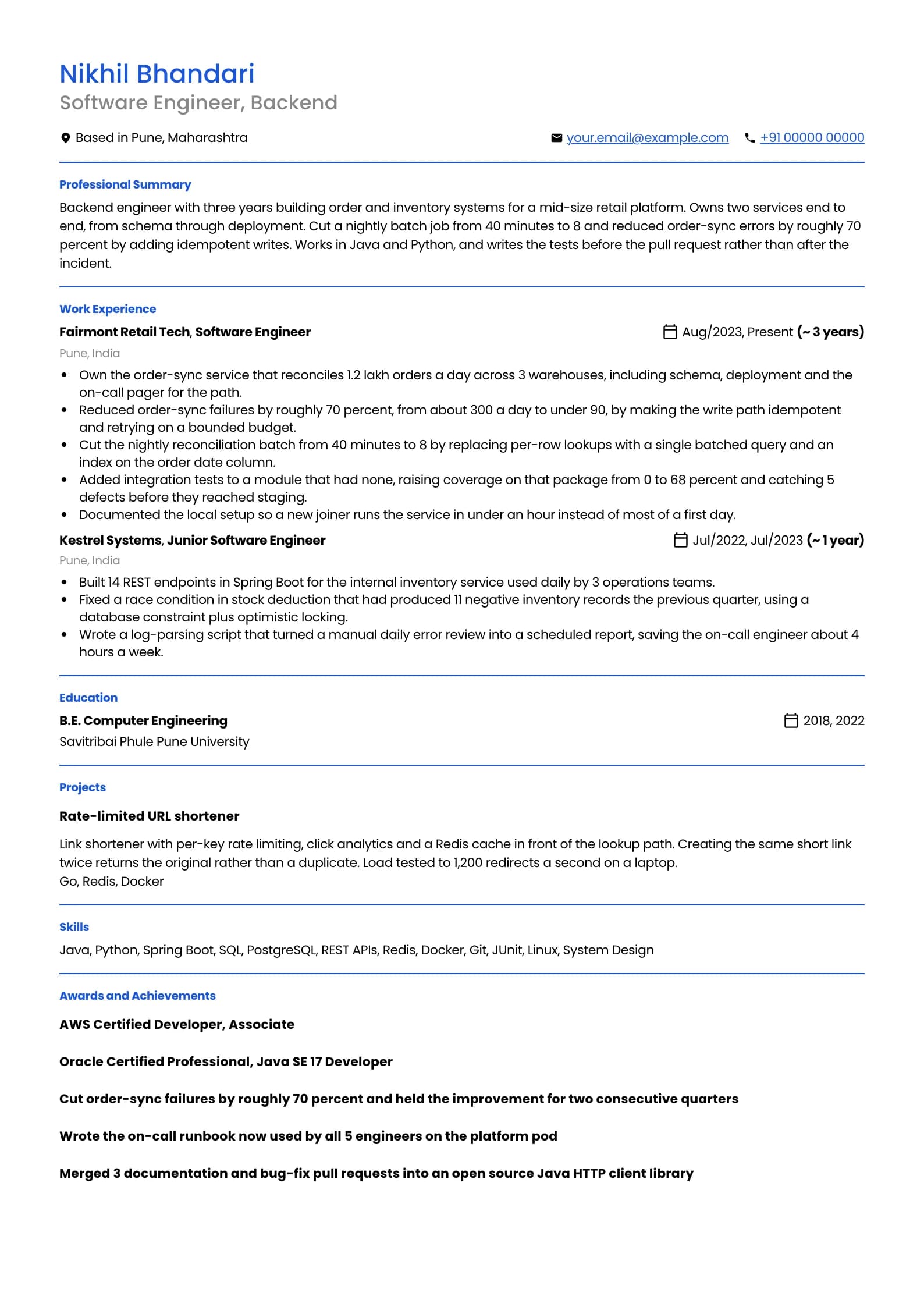
Software Engineer Resume PDF: A Download-Ready Sample and Export Guide
A PDF is the safest format to send a software engineer resume in India, but only if you export it correctly, because a PDF made the wrong way turns into an image an applicant tracking system cannot read. Below is one complete, download-ready sample built to survive parsing, followed by the exact steps to export from Word or Google Docs without the layout breaking. The single test that matters runs through the whole page: after you export, open the file and try to select and copy a sentence. If you cannot, neither can the parser.
Build my resume PDFSoftware Engineer resume example, ATS-safe PDF (3 years)
professional templateIs your resume good enough?
Upload the resume you have now and see what an applicant tracking system reads before a software engineer recruiter ever does.
Free to run. Sign in with your mobile number to see your score.
Why PDF is the default, and the one time it is not
Send a PDF unless the job posting explicitly asks for a Word file. A PDF renders the same on every machine, so the layout a recruiter opens is the layout you built, with the spacing, fonts and page breaks intact. A DOCX re-flows: a different Word version, a missing font or a slightly narrower margin can push your last role onto a second page or shift a heading mid-line, and you never see the version the recruiter does. The exception is real and worth respecting. Some large service companies and staffing agencies run their intake on an older applicant tracking system that ingests DOCX more reliably than PDF, and their posting will say so, sometimes asking for a specific format like a Naukri profile or a Word upload. When a posting names a format, give it that format. Fighting the instruction to prove a point about PDFs loses you the application, not the argument. What you should never send is a scanned or exported image dressed up as a PDF. A resume photographed, screenshotted, or exported from a design tool as a flat picture is unreadable to a parser, which sees one large image and extracts nothing, so your name, your skills and your experience all come through as blank. This is the single most common way a strong candidate gets silently filtered, and the person it happens to usually never learns why.
Exporting from Microsoft Word without breaking the layout
Word is where most resumes in India are actually written, and it exports clean PDFs if you use the right command. Do not print to PDF, and do not use a third-party PDF printer driver, because both can rasterise your text into an image on some setups. Use the built-in export instead. On Windows, go to File, then Save As or Export, choose PDF as the file type, and before saving open the Options dialog and confirm that Document structure tags for accessibility is ticked. Those tags are what carry the reading order into the PDF, and they are what let a parser rebuild your sections in sequence. On Mac, use File then Save As, pick PDF, and choose the Best for electronic distribution option rather than Best for printing, because the print option is the one that can flatten text. Before you export, strip the two things Word adds that parsers mishandle. Move anything sitting in the header or footer region, a name, a phone line, a page number band, into the body of the document, because several applicant tracking systems drop the header and footer entirely. And replace any text box or SmartArt graphic with plain paragraphs, since content inside a text box frequently parses out of order or not at all.
| Step | Windows | Mac |
|---|---|---|
| Command to use | File, then Export, then Create PDF | File, then Save As, choose PDF |
| Setting to check | Options, tick Document structure tags | Choose Best for electronic distribution |
| Avoid | Print to PDF drivers, they can rasterise text | Best for printing, it can flatten text |
| Header and footer | Move name and phone into the body | Move name and phone into the body |
After exporting, open the PDF, select a sentence with your cursor and press copy. If the text highlights and copies, the parser can read it. If nothing highlights, you exported an image and must redo it.
Exporting from Google Docs
Google Docs is the simpler case, because its PDF export always embeds real, selectable text rather than an image. Use File, then Download, then PDF Document, and the file it produces is parser-safe by default. There is no printing dialog to get wrong and no accessibility toggle to miss. The risks in Google Docs are in the document, not the export. Two features to avoid: the multi-column layout, which places your sidebar and your main body in separate flows that some parsers read in the wrong order, and the drawing or image element, which people reach for to build a skills bar or a header banner. Anything drawn or inserted as an image carries no text a parser can find. Keep the whole resume as ordinary paragraphs and a single column, and the download is clean. One Google Docs habit worth breaking is over-relying on tables for structure. A single simple table for a skills grid usually survives parsing, but people nest tables to force a two-column look, and nested tables are exactly what scramble the reading order. If you find yourself building a table to create columns, switch to a single column instead.
PDF export method
Weak
Opened the resume, pressed Ctrl+P, chose Save as PDF from the printer list, and sent that file.
Strong
Used File, then Export or Download, then the built-in PDF option, then opened the file and confirmed the text was selectable.
The print-to-PDF path can rasterise the whole page into an image on some setups; the built-in export embeds real, selectable text the parser can read.
File name, fonts and layout choices that survive parsing
Name the file with your own name and the target role, not resume_final_v4 or resume(3). A recruiter downloading fifty files wants to find yours again, and Nikhil_Bhandari_Backend_Engineer reads as considered where the version-number name reads as careless. Use an underscore or a hyphen rather than a space, since some upload systems mangle spaces in file names. Stay on a standard document font at 10 or 11 point: a system font such as Calibri, Arial, Times New Roman or a clean open font. A decorative or rare font can fail to embed and get substituted on the recruiter's machine, changing your line breaks and occasionally your page count. Keep margins at half an inch or more, so the page has air and the parser is not reading text that runs into the edge. Keep the entire document in one column. This is the rule that matters most for parsing and it is worth repeating, because two-column resumes are the single most common reason an otherwise strong page comes back scrambled. If you want visual structure, get it from spacing, bold weight and horizontal rules, not from side-by-side columns. The sample above uses one column top to bottom for exactly this reason. Finally, do not password-protect the file or set any restriction on copying its text. A protected PDF blocks the parser as effectively as an image does, and the recruiter cannot search your resume in their system if the tool could not extract the words in the first place.
| Choice | Safe | Risky |
|---|---|---|
| File name | Firstname_Lastname_Role.pdf | resume_final_v4.pdf |
| Font | Calibri, Arial, Times New Roman at 10 to 11pt | A rare decorative font that may not embed |
| Layout | Single column, standard headings | Two columns, sidebar, text boxes |
| Protection | No password, copying allowed | Password or copy-protection on the PDF |
The two-minute check before you upload
Every export can go wrong quietly, so verify before you send rather than hoping. The checks below take about two minutes and catch almost every parsing failure that would otherwise cost you the application.
- Open the PDF and select a full sentence with your cursor. If it highlights and copies as text, the parser can read it. If nothing highlights, you exported an image and must redo the export.
- Copy the whole document into a plain text editor. Read it top to bottom. Whatever order it comes out in is roughly the order the parser sees, so if your skills are interleaved with your experience, the layout is scrambling and you need a single column.
- Confirm your name and any contact placeholder sit in the body, not the header or footer region, because several systems drop the header and footer.
- Check the file size. A clean text PDF is usually well under 500 KB. A file of several megabytes almost always means an embedded image, which is the format that does not parse.
- Read the file name once more. It should carry your name and the role, use an underscore or hyphen instead of a space, and end in .pdf.
If you only do one of these, do the first. The copy-a-sentence test separates a parser-readable PDF from an image in five seconds, and it is the failure that silently sinks the most candidates.
Skills to put on a software engineer resume
Technical
- Java
- Python
- Go
- JavaScript
- SQL
- Data Structures and Algorithms
- System Design
- REST APIs
- Microservices
- Object Oriented Design
- Unit Testing
Tools and platforms
- Git
- Docker
- Kubernetes
- AWS
- PostgreSQL
- MySQL
- Redis
- Jenkins
- GitHub Actions
- Linux
Working skills
- Code review
- Technical documentation
- Cross-functional collaboration
- Incident response
- Agile delivery
- Estimation and planning
Certifications worth listing as a software engineer
| Certification | Full name | Worth it for |
|---|---|---|
| AWS DVA | AWS Certified Developer, Associate | The cloud credential most application engineers should pick first, since it names the deploy and service skills recruiters search for. Worth it for engineers with one to five years; the experience outranks the badge once you have run production workloads for years. |
| OCP Java 17 | Oracle Certified Professional, Java SE 17 Developer | Carries weight with service companies and in early-career hiring, where it is a clean signal for a fresher with no work history. Product companies mostly stop caring once you have two years of shipped Java behind you. |
Keywords an ATS scans for in a software engineer resume
These are the literal terms a parser matches against the job description. Use the ones that are true of you, in the sentences where you did the work, not as a list at the bottom.
- software engineer
- software developer
- backend development
- REST API
- microservices
- system design
- data structures and algorithms
- CI/CD
- unit testing
- agile
- code review
- AWS
- Docker
- SQL
- version control
Software Engineer resume FAQ
Which format do Indian ATS accept, PDF or Word?
Most modern applicant tracking systems used in India read both PDF and DOCX cleanly, so the safe default is PDF because it renders the same on every machine and cannot re-flow. The exception is when a posting explicitly asks for a Word file or a specific upload format, which some large service companies and staffing agencies still do, in which case send exactly what they ask for. What no system reads is an image dressed up as a PDF, so whatever format you send, confirm the text is selectable before you upload.
Why does my resume PDF fail the ATS even though it looks fine?
Almost always because the PDF is an image, not text, or because a two-column layout is being read out of order. It looks fine to your eye because you see the rendered picture, but the parser tries to extract words and finds either nothing or a scrambled sequence. Open the file, select a sentence and try to copy it: if it does not highlight, it is an image and you exported it the wrong way. If it copies but comes out interleaved, switch to a single column.
How do I export a resume to PDF without losing formatting?
Use the built-in export inside your editor rather than a print-to-PDF driver. In Word, use File then Export then Create PDF, and tick Document structure tags in the options. In Google Docs, use File then Download then PDF Document, which is text-safe by default. Avoid printing to PDF or using a third-party PDF printer, because on some setups those flatten your text into an image and take the formatting and the readable text with it.
Should I password-protect my resume PDF?
No. A password or a copy-protection setting blocks the parser exactly as an image does, so the recruiter cannot extract or search your resume in their system. There is no upside for a job application: the file is going to a recruiter you want to read it, not to a stranger you want to lock out. Send an unprotected PDF that allows text selection and copying.
What should I name my resume PDF file?
Use your own name and the target role, for example Firstname_Lastname_Backend_Engineer.pdf, with an underscore or a hyphen instead of a space. A recruiter downloading many files wants to find yours again, and a clear name reads as considered where resume_final_v4.pdf reads as careless. Avoid spaces because some upload systems mangle them, and always end the file in .pdf.
Is a one-page or two-page PDF better for a software engineer?
One page up to about six years of experience, two pages after that, and only if the second page carries real work rather than a longer skills list. The format of the file, PDF, does not change this. If you are spilling onto a second page early, cut the oldest role to a single line, drop coursework, and remove any technology you would not want to be interviewed on.
Related resume examples and guides
Export a parser-safe PDF in one click
Build or upload your resume in Goodspace, render it in any of 24 templates, and download a single-column PDF with real, selectable text that an applicant tracking system can read.
Build my resume PDF