IT Support Resume Format, with 3 Full Samples
An IT support professional is hired on evidence of systems kept running, users unblocked fast and downtime cut, yet most resumes list Windows, hardware and troubleshooting and stop there. Below are three complete resumes, one for a fresher moving from a helpdesk internship into L1 desktop support, one for a desktop support engineer who owns endpoints, Active Directory and a ticket queue, and one for a senior IT support engineer who runs the service desk and the asset and access programmes behind it. After the samples come the format rules, the difference between naming a tool and proving you fixed with it, the terms a parser matches literally, and the mistakes that end a screening before a human reads the page.
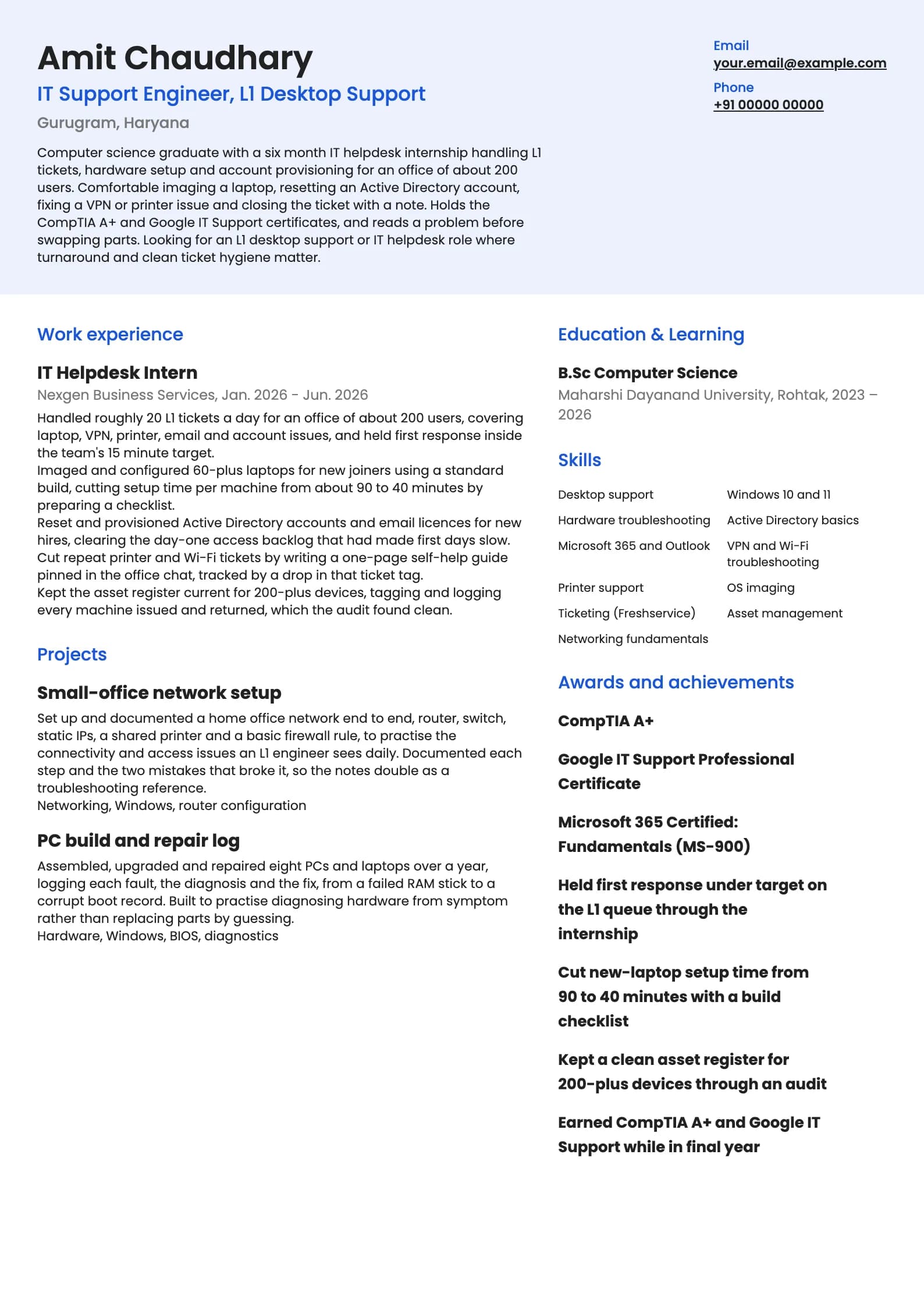
Build my resumeIT Support resume example, Fresher (0 to 1 year)
modern templateIs your resume good enough?
Upload the resume you have now and see what an applicant tracking system reads before a it support recruiter ever does.
Free to run. Sign in with your mobile number to see your score.
IT Support resume example, Desktop Support (4 years)
professional template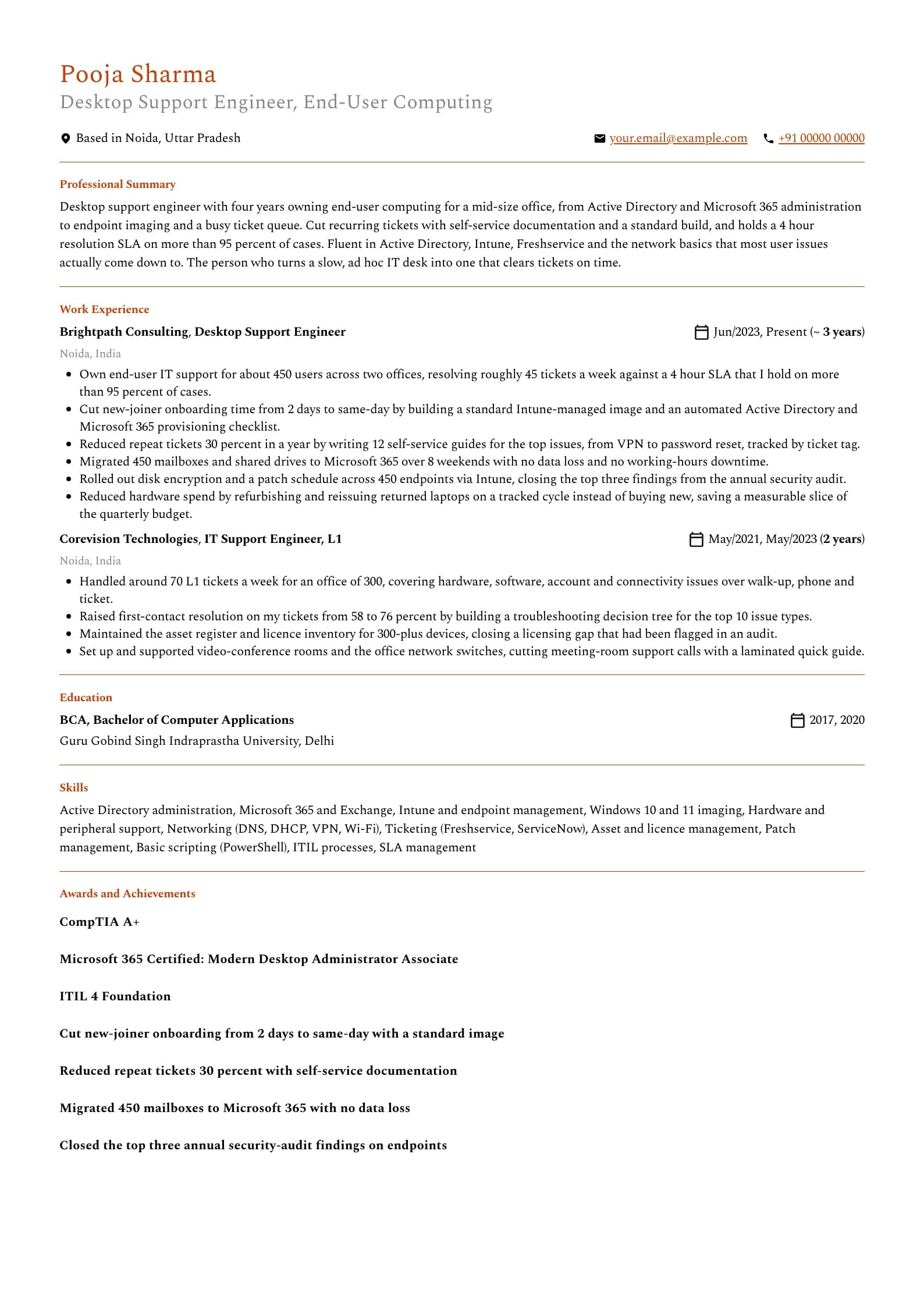
Want this structure with your own details? Build it in the resume builder.
IT Support resume example, Senior IT Support (8 years)
header-band template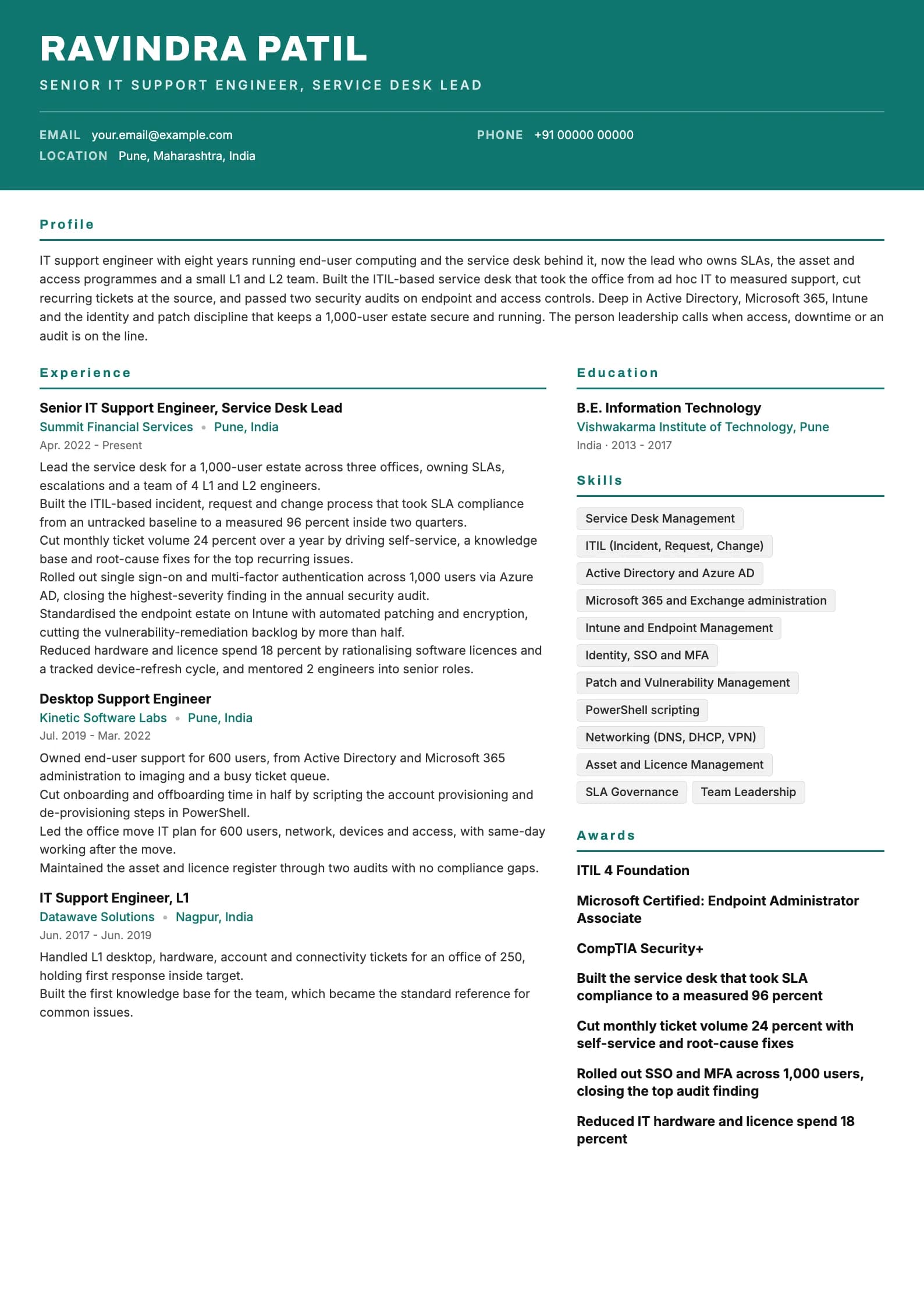
The format that works for IT support resumes in India
Reverse chronological is the layout to use. Put the current role first, work backwards, and keep the dates visible. Functional resumes that hide the timeline under a Skills heading read as an attempt to cover a gap or a run of short stints, and IT support hiring, where contracts and short tenures are common, is exactly where reviewers check for that. Length follows evidence. One page covers a fresher and most engineers up to roughly six years. A senior engineer running a service desk and access programmes can justify a second page, but only if it carries real service-management work rather than a longer list of tools touched. A second page built from a hobbies line and a declaration is a padded one-page resume. Four things do not belong on an IT support resume here: a photograph, date of birth, marital status and father's name. They come from an older campus template and add nothing to a technical screen. Every line they take is a line an SLA number or an audit result could have used. Send a PDF unless the posting asks for DOCX, name the file with your own name and the target role, and keep it a single column top to bottom. Two-column layouts, common on IT support resumes because people cram a long tools sidebar in, parse unpredictably when the parser hits the sidebar. The table below sets the section order.
| Section | Where it goes | Why |
|---|---|---|
| Name and headline | Top, above everything | The headline names the function, desktop support or service desk. Recruiters match on it. |
| Professional summary | Directly under the header | Three lines. Function, years, and the single strongest support result. |
| Work experience | Next, for anyone with an IT job | Most recent first. Current role gets the most bullets and the SLA numbers. |
| Skills | Below experience, grouped | Support, systems, tools, networking. Not a 30-item wall. |
| Certifications | After skills or beside education | A+, ITIL, a Microsoft associate cert. Name, body, year. |
| Projects or lab work | For freshers, above experience | For a fresher, a home network or a PC repair log is the evidence. |
| Education | Bottom, unless you are a fresher | Degree, institution, years. Drop the percentage after your first job. |
Naming a tool is not the same as proving you fixed with it
The most common IT support resume failure is a skills line reading Windows, Active Directory, Microsoft 365, Intune, VMware, Networking, Hardware, Ticketing with no bullet anywhere showing an issue resolved, an SLA held or a rollout delivered. A parser matches those names, but a hiring manager reads the list and assumes you have seen each rather than run it, then goes looking for the one you can actually operate. The fix is to let the experience carry the numbers. IT support is measurable, so a resume with no numbers is leaving its strongest evidence on the table. Ticket volume, first response time, SLA hit rate, first-contact resolution, onboarding time, repeat-ticket reduction, uptime and audit findings closed are all facts a reviewer can weigh. The desktop sample lists Intune and Active Directory precisely because its bullets show a standard image built and mailboxes migrated, so the tool and the outcome agree. Be specific about scale and environment. Supporting 40 users is a different job from supporting a 1,000-user estate across three offices, so say which. Name whether the environment is Windows and Microsoft 365, a mixed fleet, or a regulated office with audit requirements, because a shop hiring for identity and endpoint work does not want a resume that could equally be a walk-up helpdesk. Do not pad with every enterprise product you have glimpsed. An IT support resume gains far more from one bullet showing a clean Active Directory and Microsoft 365 onboarding automation than from five virtualisation and backup tools listed and none operated.
For every tool on your skills line, ask: is there a bullet that shows me operating it, not just seeing it. If not, add the bullet or cut the tool. IT support is measurable, so a resume with no ticket, SLA or uptime numbers is hiding its best evidence.
Writing an IT support summary a hiring manager actually reads
The block under your name is the part you can count on being read, so it should carry three facts: what you support and at what scale, how long you have done it, and the strongest thing that happened because of your work. Three or four lines, no adjectives a reference could not confirm. The old objective, seeking a challenging position in the IT field in a reputed organisation to enhance my skills, tells the reader nothing the application did not already say. Replace it with a summary. An objective describes what you want; a summary describes what you have already done, and only one is evidence a screener can act on. Freshers often think they have nothing to summarise. The fresher sample names the office size from an internship, the ticket volume, the response performance and a genuine diagnosis habit built through a PC-repair log. That is a real summary drawn from one internship and some hands-on practice. What it avoids is "hardworking IT enthusiast eager to learn", a phrase so common on support resumes it now carries no information. A practical test: read your summary and ask whether a colleague from the same desk could paste it onto their resume unchanged. If they could, it describes the desk, not you. Add the specific scale, the specific SLA and the specific ownership until it stops being transferable.
Professional summary, desktop support
Weak
Hardworking and dedicated IT support professional with 4+ years of experience in desktop support, Windows, Active Directory and networking, seeking a challenging role in a reputed organisation.
Strong
Desktop support engineer with four years owning end-user computing for 450 users, from Active Directory and Microsoft 365 to imaging and a busy queue. Cut onboarding from two days to same-day and hold a 4 hour SLA on 95 percent of tickets.
The rewrite trades a tool list and self-description for a scale, an ownership scope and two verifiable support results.
Experience bullets: verb, issue or change, and its effect
Every strong bullet in the samples has the same shape. It opens with an action verb, names the issue you resolved or the change you rolled out, and closes with what measurably moved. The verb says you did it. The issue or change tells a reviewer whether the work matches their environment. The number does the persuading. Start with the outcome and work backwards. Support engineers tend to write the activity first, which produces bullets like "provided desktop support and resolved user issues on a daily basis". Instead ask what was different after you owned the desk: an SLA hit rate rose, onboarding got faster, repeat tickets fell, a migration landed with no data loss, an audit finding closed. Then write the sentence that ends in that fact. Vary the metric. Five ticket counts in a row read as one trick. Across a real IT support role you can honestly reach for SLA compliance, first-contact resolution, onboarding time, repeat-ticket reduction, devices managed, uptime, audit findings closed and budget saved. The desktop sample moves across several, which reads as genuine ownership. Where you lack a clean number, give scale: how many users, how many devices, how many offices, how many mailboxes. "Own end-user IT for 450 users across two offices" carries weight without inventing a percentage. Allocate bullets by recency. Current role gets five or six, the previous role four or five, anything older two or three.
| Level | What bullets must prove | Typical metric |
|---|---|---|
| Fresher / L1 | You resolve routine user issues and keep records clean | Tickets a day, first response, machines imaged, asset accuracy |
| Desktop support (2 to 5 years) | You own the environment and automate the repeatable parts | SLA hit rate, onboarding time, repeat-ticket cut, migrations |
| Senior (5 to 8 years) | You run the service desk and the access and asset programmes | SLA compliance, ticket-volume cut, audit findings, spend saved |
| Lead (8 years and up) | You set process and secure the estate | SLA governance, SSO and MFA rollout, vulnerability backlog, team |
Experience bullet, desktop support
Weak
Responsible for providing desktop support, installing software and resolving hardware and network issues for the users in the organisation.
Strong
Cut new-joiner onboarding from 2 days to same-day by building a standard Intune-managed image and an automated Active Directory and Microsoft 365 provisioning checklist.
"Responsible for" describes the job posting; the rewrite names the change made and the onboarding delay it removed.
Experience bullet, security work
Weak
Worked on security and compliance related tasks to ensure the systems were secure and up to date.
Strong
Rolled out disk encryption and a patch schedule across 450 endpoints via Intune, closing the top three findings from the annual security audit.
Names the exact controls, the number of endpoints and the audit findings closed, so a reviewer can ask a real follow-up instead of nodding at a vague claim.
If a bullet would read identically on a teammate's resume, it is describing the desk, not you. Rewrite it until it only fits the environment and the change you actually owned.
The skills section: grouped by what you actually run
An IT support resume's skills section serves two readers with opposite tastes. The parser wants literal terms it can match, Active Directory and Intune and Microsoft 365. A hiring manager wants a short, organised list that signals what kind of support engineer you are. Grouping serves both. Group by function rather than one long line. Support, systems and identity, endpoint and tools, and networking is a grouping that fits almost every IT support engineer. The exact headings matter less than the fact that structure exists. Write names the way the industry writes them: Microsoft 365 not MS365, Active Directory not AD on first use, PowerShell not Powershell. A parser matches on strings. Twelve to sixteen skills is the working range. Below eight it looks thin. Above twenty it stops being a signal, and IT support resumes are especially prone to listing every operating system, backup product and virtualisation tool the company ever ran. The list is a contract: every item is a question you have agreed to answer, so a tool you cannot operate in front of an interviewer costs you more than it gains. Put identity, endpoint and networking forward, because they are what modern IT support is actually judged on. Active Directory, Microsoft 365, Intune and the network basics behind most user issues outweigh a long hardware list. Anyone can swap a RAM stick; managing 500 endpoints and their access cleanly is why they hire you.
| Group | What goes in it | How many |
|---|---|---|
| Support | Desktop support, troubleshooting, hardware, ticketing, SLA | 3 to 5 |
| Systems and identity | Active Directory, Azure AD, Microsoft 365, Exchange, SSO | 3 to 5 |
| Endpoint and tools | Intune, imaging, patch management, Freshservice, ServiceNow | 2 to 4 |
| Networking | DNS, DHCP, VPN, Wi-Fi, TCP/IP | 2 to 3 |
| Automation | PowerShell, scripting, ITIL processes | 1 to 3 |
Skills section
Weak
Skills: Windows XP, Windows 7, Windows 10, Windows 11, MS Office, Outlook, Hardware, Software, Printer, Networking, Troubleshooting, Active Directory, VPN, Antivirus, Team Player, Hardworking, Communication, Fast Learner, Ticketing, Remote Support
Strong
Support: desktop support, troubleshooting, ticketing, SLA. Systems: Active Directory, Azure AD, Microsoft 365, Exchange. Endpoint: Intune, imaging, patch management. Networking: DNS, DHCP, VPN, Wi-Fi. Automation: PowerShell, ITIL.
Cuts the ancient OS versions and personality adjectives, groups the rest so a human reads it in one pass, and leads with the identity and endpoint skills modern IT support is judged on.
Showing you can grow past the walk-up desk
The difference between an L1 who resets passwords all day and an engineer worth promoting is whether you make the same problem stop coming back. The resume is where you prove which one you are, and the evidence is a bullet showing you automated, documented or root-caused instead of just resolving faster. The common failure is a resume that is a wall of routine activity: installed software, reset accounts, replaced hardware, resolved tickets. All of it is true, and none of it separates you from every other L1. Pair the routine with at least one bullet that shows leverage: a standard image that halved onboarding, a PowerShell script that automated provisioning, a self-service guide that cut a ticket class, an audit finding closed. The onboarding-automation bullet in the desktop sample is what moves that candidate up a band. Name the systems that carry seniority, not just the ones you touch daily. Active Directory and Azure AD administration, Intune and endpoint management, identity with SSO and MFA, and patch and vulnerability work are the responsibilities that mark you as ready for more than the walk-up queue. If you own any of them, put them in a bullet, because they are what a hiring manager screens for when filling a senior IT support role. At senior level, the strongest evidence is process and security. An engineer who built an ITIL-based service desk, took SLA compliance from untracked to measured, and passed a security audit is operating at a different level from one who closes tickets fast. Support that changes how IT is delivered is the ceiling of the role, so lead with it if you have it.
One bullet showing you stopped a ticket class from recurring outweighs three showing how many you closed. Volume proves you were busy; automation and root-cause work prove you are ready for the next band.
Getting through the applicant tracking system
An applicant tracking system is a parser and a search index, not a judge. It reads your file, tries to split it into name, dates, employers, titles and skills, and stores the result so a recruiter can search across candidates. Almost every ATS problem is a parsing problem, and parsing problems come from layout, not wording. The layout rules are short. One column. Standard section headings, so use Work Experience rather than My IT Career, and Skills rather than My Tech Stack. No text inside images, because a strip of software logos reads as empty space. No critical information in the header or footer region, which some parsers drop. Avoid text boxes and nested tables in the body. On wording, mirror the language of the job description where it is honest. If the posting says desktop support engineer, use that title rather than IT executive. If it says Active Directory, Microsoft 365, ITIL or SLA, and you have done it, write those exact terms. Spell out an acronym alongside its short form at least once, for example "AD (Active Directory)", so both searches find you. Keyword stuffing does not work. A hidden block of every operating system and tool in white text is found quickly, and the outcome is worse than being filtered. Write real bullets that naturally contain the right terms, because a bullet describing an Intune rollout contains the word Intune in a context that also survives human review. Save as PDF from a tool that embeds real text, then open the file and confirm you can select and copy a sentence. If you cannot select the text, neither can the parser.
Section heading
Weak
My IT Journey So Far
Strong
Work Experience
Parsers look for standard headings; a creative one can push the whole block into an unclassified bucket the recruiter never searches.
What gets IT support resumes rejected
Most rejections at the resume stage are not close calls. They come from a small set of recurring problems, and every one is fixable in an afternoon. The list below covers what reviewers of Indian IT support resumes see most often, in rough order of how much damage each one does.
- A wall of operating systems and tools with no bullet showing an issue resolved, an SLA held or a rollout delivered. Every tool is a question you have agreed to answer.
- No support numbers anywhere. Tickets, SLA, first-contact resolution, uptime, onboarding time. IT support is measurable, so this is the worst omission.
- Only routine activity, no leverage. Reset, installed, replaced, resolved, with nothing showing you automated, documented or root-caused.
- No scale stated. Supporting 40 users and a 1,000-user estate are different jobs, and a resume that omits the number forces a guess.
- Job duties copied from the posting instead of what you did. "Responsible for providing desktop support" is the tell.
- A photo, date of birth, marital status or father's name. None of it belongs on a technical resume, and it takes a result's space.
- Ancient OS versions like Windows XP and Windows 7 padding the skills line, which reads as filler on a current-year resume.
- A generic objective line. Replace it with a summary that states function, scale and one result.
- Inflated titles or dates that do not match your offer letters. Background verification is standard and a mismatch ends the process.
- Typos in the tools you claim to run, Intune written as Intune with the wrong spelling or PowerShell as Powershel, which undoes an otherwise strong page.
Read your resume aloud once before sending it. Any bullet you would be embarrassed to defend to an interviewer is a line to cut or rewrite.
Skills to put on a it support resume
Technical
- Desktop and End-User Support
- Windows 10 and 11
- Active Directory and Azure AD
- Microsoft 365 and Exchange
- Intune and Endpoint Management
- OS Imaging and Deployment
- Networking (DNS, DHCP, VPN, Wi-Fi)
- Hardware Troubleshooting
- Patch and Vulnerability Management
- PowerShell Scripting
- Identity, SSO and MFA
- Remote Support
Tools and platforms
- Freshservice
- ServiceNow
- Jira Service Management
- Microsoft Intune
- Azure AD
- Microsoft 365 Admin
- TeamViewer and AnyDesk
- SCCM
- Active Directory Users and Computers
- Exchange Admin
- VMware
- Antivirus and EDR consoles
Working skills
- User communication
- Patience under pressure
- SLA discipline
- Documentation and KB writing
- Ticket hygiene
- Cross-team collaboration
- Asset accountability
- Prioritisation
- Mentoring
Certifications worth listing as a it support
| Certification | Full name | Worth it for |
|---|---|---|
| CompTIA A+ | CompTIA A+ | The classic entry credential for desktop and helpdesk support, covering hardware, operating systems and troubleshooting fundamentals. Worth it for freshers and career switchers to prove the basics on paper, and it reads well for any walk-up or L1 role. Less decisive once you have years of real support experience and identity or endpoint work to point at. |
| ITIL 4 Foundation | ITIL 4 Foundation | The most-requested service-management credential in Indian IT support postings. It gives you the incident, request, problem and change vocabulary that any real service desk runs on, and it is worth holding from a couple of years in. Especially valuable when you move toward service-desk lead or coordinator roles. |
| MD-102 | Microsoft Certified: Endpoint Administrator Associate | The current Microsoft credential for managing Windows endpoints with Intune, the day job of modern desktop support. Worth it for engineers who own imaging, patching and device management, and a strong differentiator in a field where many resumes still list only hardware. Pairs naturally with a Microsoft 365 environment. |
| MS-900 | Microsoft 365 Certified: Fundamentals | An easy, entry-level credential proving you know the Microsoft 365 landscape most offices run on. Good on a fresher or early-career resume to show you understand the environment beyond just Outlook. Build toward the associate-level administrator certs once you support it in production. |
| CompTIA Network+ | CompTIA Network+ | A solid signal for IT support engineers whose work touches connectivity, DNS, DHCP, VPN and Wi-Fi issues, which most does. Worth it in the first few years to prove networking fundamentals on paper. Complements A+ well and strengthens a resume aimed at infrastructure-leaning support. |
Keywords an ATS scans for in a it support resume
These are the literal terms a parser matches against the job description. Use the ones that are true of you, in the sentences where you did the work, not as a list at the bottom.
- it support
- desktop support
- helpdesk
- active directory
- microsoft 365
- intune
- windows
- troubleshooting
- ticketing
- servicenow
- SLA
- ITIL
- networking
- VPN
- hardware
- asset management
- patch management
- endpoint management
- powershell
- end user support
IT Support resume FAQ
What salary can an IT support professional expect in India?
A fresher or L1 desktop support engineer typically starts around 2.5 to 4.5 LPA, higher in product companies and captive IT centres than in staffing firms. A desktop support engineer with four to six years owning the environment usually sits in the 5 to 10 LPA band. Senior IT support engineers and service-desk leads with seven years and above commonly earn 12 to 22 LPA. Identity, endpoint and cloud administration skills, plus a Microsoft associate certification, push the top of every band upward.
How long should an IT support resume be?
One page up to about six years, two pages after that only if the second page carries real service-desk or access-programme work rather than a longer tools list. Nobody is rejected for a resume that is easy to read. If you are struggling to fit one page, cut the oldest role to a single line, remove coursework, and delete any tool you would not want to be interviewed on.
What is the difference between IT support and technical support engineer?
IT support, also called desktop support or helpdesk, keeps an organisation's own users, devices and access working, Windows, Active Directory, Microsoft 365, hardware and the network. A technical support engineer usually supports an external customer's use of a software product, working tickets, APIs and root causes in that product. They overlap in troubleshooting method and ticketing, but name the one your experience actually fits so you apply to the right band and are not screened for the wrong job.
What metrics should an IT support resume include?
IT support is measurable, so use its numbers. Ticket volume, first response time, SLA hit rate, first-contact resolution, onboarding time, repeat-ticket reduction, devices managed, uptime and audit findings closed are all facts a reviewer can weigh. Vary them across your bullets rather than repeating a ticket count, and pair the routine work with at least one bullet showing you automated or root-caused something, so the resume proves leverage and not just activity.
Do certifications like CompTIA A+ or ITIL help?
Yes, more than in most fields, because IT support hiring leans on them for freshers with no work history. CompTIA A+ proves hardware and OS fundamentals for an L1 role, ITIL 4 Foundation gives you the service-management vocabulary for anything beyond the walk-up desk, and a Microsoft endpoint or Microsoft 365 associate cert differentiates you for modern desktop work. As always, once you have years of real support experience, the certificate matters less than the results.
How do I write an IT support resume as a fresher?
Lead with any helpdesk internship, then projects, then skills and education. Treat a home network setup or a PC-repair log as evidence: name what you diagnosed and how you found the cause, not just the parts. Add anything checkable, a CompTIA A+ or Google IT Support certificate, an office size you supported, machines you imaged, since verifiable facts carry more weight than "hardworking IT enthusiast". Even at L1, clean asset records and diagnosis over part-swapping are real, nameable skills.
Should I focus on hardware or on systems and identity?
Systems and identity carry more weight for growth. Hardware troubleshooting is table stakes and easily learned, but Active Directory, Microsoft 365, Intune and identity work with SSO and MFA are what a hiring manager screens for when filling a senior IT support role. List your hardware skills, but put the identity, endpoint and networking work forward and prove it in a bullet, because that is what moves you up a salary band.
Does an ATS reject IT support resumes with two columns?
It does not reject them outright, but some parsers read multi-column layouts out of order, which interleaves your tools sidebar with your experience and produces nonsense in the recruiter's view. IT support resumes are prone to this because people cram a long tools column in. A single-column layout removes the risk, which is why all three samples above use one. Copy the text out of your PDF into a plain editor; if it reads in order there, it will most likely parse correctly.
Do I need a photo on an IT support resume in India?
No. Tech and IT recruiters do not expect one, and it takes space a support result should occupy. The same goes for date of birth, marital status, father's name, nationality and a declaration paragraph. These come from an older template that spread through campus placement cells and add nothing to a technical screen. The only exception is a role that explicitly asks for a photograph in the posting.
Related resume examples and guides
Build your own in any of these formats
Start from a blank resume or upload the one you have. Goodspace renders it in 24 templates and flags the Active Directory, Microsoft 365 and ITIL keywords an applicant tracking system will look for, and the tool-list padding it will not credit.
Build my resume