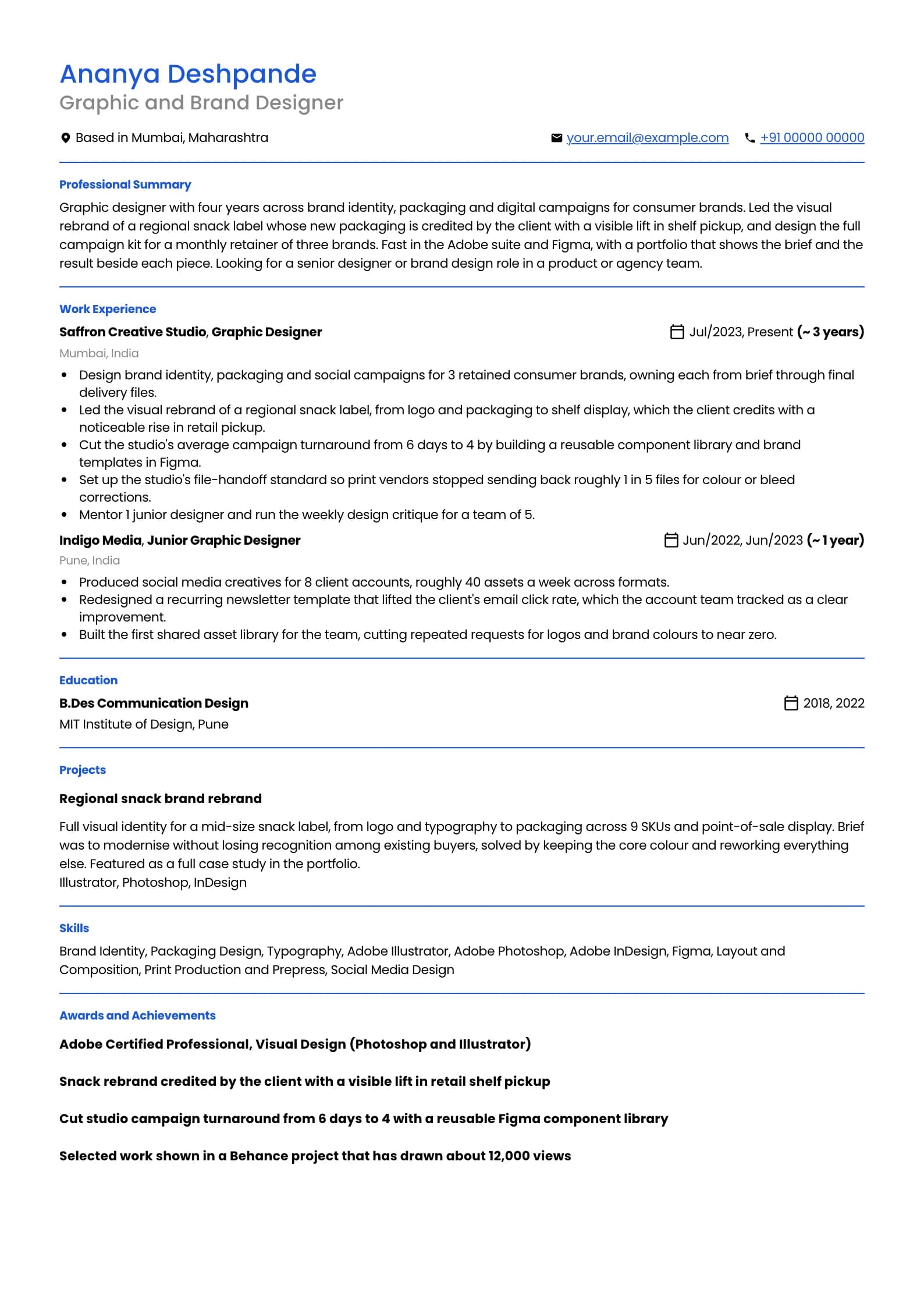
Graphic Designer Resume PDF: Portfolio-Ready and ATS-Safe
A graphic designer faces a bind no other role does: the resume is judged on how it looks, but it is also parsed by software that reads only text, so the beautiful two-column layout that impresses an art director can come back blank from an applicant tracking system. This page resolves that. Below is one complete, download-ready sample that stays clean to a parser while pointing at the real proof, your portfolio, plus how to add a link that actually works and how to export a designed resume without turning it into an unreadable image.
Build my designer resumeGraphic Designer resume example, Portfolio-ready PDF (4 years)
professional templateIs your resume good enough?
Upload the resume you have now and see what an applicant tracking system reads before a graphic designer recruiter ever does.
Free to run. Sign in with your mobile number to see your score.
The designer's dilemma: beautiful for a human, readable for a parser
A graphic designer's resume is the one document where the applicant's craft and the recruiter's software pull in opposite directions. You want it to look like your work, which pushes you towards a two-column layout, custom type, an infographic skills bar and a colour block behind your name. An applicant tracking system wants plain text in one flow, and reads most of those design choices as either scrambled order or blank space. The resolution is to stop asking the resume to be the portfolio. The resume is a text document that proves you can be found, matched and shortlisted; the portfolio is where your visual craft is judged. Once you separate the two, the resume can be clean and parser-safe without losing you anything, because the impressive visual argument lives at the other end of a link. The sample above is designed, spacing, weight and a single accent, but it is a single column of real text, and it would survive any parser. Send it as a PDF, because a PDF renders identically everywhere and a DOCX re-flows and can substitute your fonts. The only exception is a posting that explicitly asks for a Word file, which some agencies and staffing intakes do, in which case send exactly that. And whatever you send, never send a flat image exported from a design tool, because that is the format a parser cannot read at all.
The portfolio link is the most important line on the page
For a graphic designer, the portfolio is the hire decision, so the link to it is the single most valuable line on the resume, and it needs to actually work. Write the full URL as plain, selectable text near the top of the page, next to your name and location. Do not bury it inside a clickable word like portfolio or behind a small icon, because a parser reads the underlying text and a recruiter working from a printout cannot click anything at all. Use a link that will still resolve in a year. A personal domain or a stable Behance, Dribbble or Adobe Portfolio URL is safe; a link to a specific cloud folder that you might reorganise, or a shortened link that could expire, is not. Point it at a curated set, not everything you have ever made. Six to ten strong pieces that show range beat forty that show volume, because a recruiter spends under a minute in a portfolio and the weakest piece they see is the one they remember. Make sure the destination is ready before you send. A portfolio link that opens to a login wall, a broken page, three placeholder projects or a coming soon banner does more damage than no link at all, because the recruiter clicked with intent and hit a dead end. Present each piece with a line of context, the brief and the outcome, so a viewer understands the thinking and not only the visual, which is exactly what separates a designer from a decorator in an interview.
Portfolio link on the resume
Weak
Placed the word Portfolio as a hyperlinked button in the header, styled to match the accent colour, with no visible URL.
Strong
Wrote the full address as plain text near the name: portfolio at your-portfolio-link, and kept a stable Behance link beside it.
A styled button carries no readable URL for a parser or a printout; a plain-text address works for the software, the recruiter and anyone reading a printed copy.
Open your own portfolio link in a private browser window before you send the resume. If it needs a login, shows a placeholder, or 404s, the most important line on your resume is currently a dead end.
Exporting a designed resume so it stays readable
Designers build resumes in the tools they know, and each one has a way to export a PDF that keeps the text real rather than flattening it into a picture. The rule across all of them is the same: the exported PDF must contain selectable text, not an image of text. If you designed it in Illustrator or InDesign, export to PDF and make sure the text stays as live text: do not outline or rasterise your type before exporting, because outlined text becomes a shape a parser cannot read. In InDesign, an interactive or print PDF export both keep text live as long as you have not flattened it. If you built it in Figma, export to PDF rather than to PNG or JPG, since the image formats are pictures with no readable text, and that mistake is common because Figma designers reach for PNG by habit. Wherever it was built, if the layout genuinely cannot be made parser-safe, a designer working near print or brand will sometimes send two files: the designed PDF for the human, and a plain single-column PDF or the same content pasted into the application's text fields for the software. That is a reasonable hedge for a heavily visual resume, but it is a fallback, not the default, and the cleaner answer is to design the one resume so it reads both ways, as the sample above does.
| Built in | Export as | Do not |
|---|---|---|
| Illustrator or InDesign | PDF with live text | Outline or rasterise the type before export |
| Figma | PDF, not PNG or JPG | Export the image formats, they carry no text |
| Word or Google Docs | Built-in PDF export | Print to PDF drivers, they can rasterise text |
| Canva | PDF Standard with selectable text | Download as image, or add text inside graphics |
Verify the file before you upload it
A designer's resume has more ways to fail parsing than most, so the check before sending matters more. These take about two minutes and catch the failures that would otherwise cost you a shortlist you had earned on craft.
- Open the PDF and select a sentence with your cursor. If it highlights and copies, the parser can read it. If nothing highlights, you exported an image and must redo it.
- Copy the whole document into a plain text editor and read it top to bottom. If your skills sidebar is interleaved with your experience, the two-column layout is scrambling and you need a single column.
- Confirm the portfolio URL comes out as readable text in that copy, not as an empty gap where a styled button was.
- Open your portfolio link in a private browser window and confirm it resolves to curated work, with no login wall, placeholder or broken page.
- Check the file size. A clean text-and-vector PDF is usually well under 1 MB; several megabytes almost always means embedded images, which is the format that does not parse.
- Name the file with your name and the role, using an underscore or hyphen, for example Firstname_Lastname_Graphic_Designer.pdf.
Skills to put on a graphic designer resume
Technical
- Brand Identity
- Typography
- Layout and Composition
- Packaging Design
- Print Production and Prepress
- Colour Theory
- Vector Illustration
- Design Systems
- Social Media and Campaign Design
Tools and platforms
- Adobe Illustrator
- Adobe Photoshop
- Adobe InDesign
- Figma
- Adobe After Effects
- Canva
- CorelDRAW
Working skills
- Taking and interpreting a brief
- Presenting design decisions
- Feedback and iteration
- Working to deadlines
- Collaboration with copy and marketing
- Attention to detail
Certifications worth listing as a graphic designer
| Certification | Full name | Worth it for |
|---|---|---|
| Adobe Certified Professional | Adobe Certified Professional, Visual Design | A recognisable signal for designers early in their career or applying to agencies that run on the Adobe suite, since it validates Photoshop and Illustrator fluency by name. Less needed once a strong portfolio speaks for itself, because for a designer the portfolio is always the stronger credential. |
| Figma or UX cert | Google UX Design Professional Certificate or a Figma course | Worth it for a graphic designer moving towards product and UI work, where Figma and basic UX process are expected. It signals the shift and gives structure to a first UI portfolio, but pair it with real interface work rather than treating the certificate as the qualification. |
Keywords an ATS scans for in a graphic designer resume
These are the literal terms a parser matches against the job description. Use the ones that are true of you, in the sentences where you did the work, not as a list at the bottom.
- graphic designer
- brand designer
- visual design
- brand identity
- typography
- packaging design
- Adobe Illustrator
- Adobe Photoshop
- Adobe InDesign
- Figma
- layout
- print production
- social media design
- portfolio
- design systems
Graphic Designer resume FAQ
Which format do Indian ATS accept for a designer, PDF or Word?
Most modern applicant tracking systems used in India read both PDF and DOCX, so send a PDF by default because it renders identically everywhere and will not re-flow or substitute your fonts. The exception is a posting that explicitly asks for a Word file, which some agencies and staffing intakes do, in which case send that. What no system reads is a flat image exported from a design tool, so whichever format you send, confirm the text is selectable before uploading.
How do I make a graphic designer resume that is both good-looking and ATS-friendly?
Stop asking the resume to be the portfolio. Keep the resume a single column of real text, designed through spacing, weight and one accent colour rather than through a two-column layout, an infographic skills bar or text inside graphics. Put your visual craft in a linked portfolio, which is where it is actually judged. That way the resume parses cleanly and your design ability is proven at the other end of the link, so you lose nothing to the software.
Where do I put my portfolio link on a designer resume?
Write the full URL as plain, selectable text near the top of the page, next to your name and location, not buried inside a clickable word or an icon. A parser reads the underlying text and a recruiter working from a printout cannot click anything. Use a stable link, a personal domain or a lasting Behance, Dribbble or Adobe Portfolio URL, and point it at a curated set of six to ten strong pieces rather than everything you have made.
Why does my designed resume come back blank from an ATS?
Almost always because it is an image rather than text, or because a two-column layout is being read out of order. It looks fine to you because you see the rendered picture, but the parser tries to extract words and finds nothing or a scrambled sequence. Open the file, select a sentence and try to copy it: if it does not highlight, you exported an image, often a PNG or an outlined-text PDF, and need to export live text instead.
Should I export my resume from Figma as a PDF or PNG?
PDF, always, and never PNG or JPG for a resume. A PNG is a picture with no text a parser can read, so exporting one guarantees the applicant tracking system extracts nothing. Figma designers reach for PNG by habit, which is exactly why this mistake is common. Use Figma's PDF export, then open the file and confirm you can select and copy a sentence to be sure the text stayed live.
Do I still need a text resume if I have a strong portfolio?
Yes. The portfolio wins the hire decision, but the resume is what gets you into the shortlist: it is parsed, searched and matched by software, and read quickly by a recruiter to check your experience, tools and eligibility. A brilliant portfolio behind a resume that a parser cannot read never gets opened, because the application is filtered before a human sees the link. You need both, each doing its own job.
Related resume examples and guides
Export a designer resume that parses and points to your work
Build or upload your resume in Goodspace, render it in any of 24 templates, add a portfolio link that reads as plain text, and download a single-column PDF an applicant tracking system can actually read.
Build my designer resume