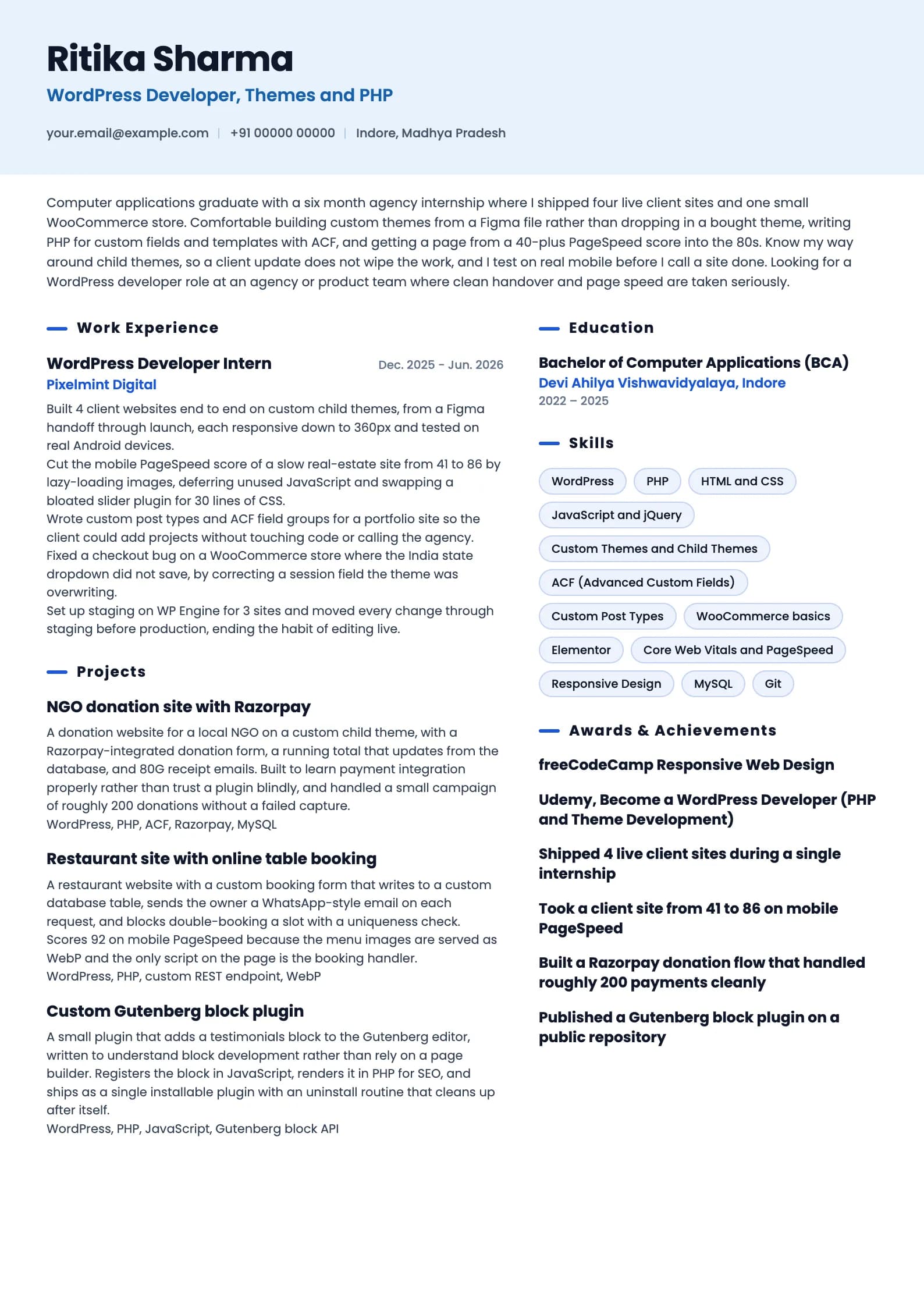
WordPress Developer Resume Format, with 3 Full Samples
A WordPress developer is hired on evidence of sites that load fast, custom themes and plugins that survive a core update, and stores that take money without breaking on sale day. Most WordPress resumes instead list Elementor and forget the one migration that saved a client from a hacked host. Below are three complete resumes, one for a fresher who has shipped real client sites through an agency internship, one for a developer with four years building custom themes and WooCommerce stores, and one for a senior developer owning multisite platforms and performance at scale. After the samples come the format rules, the difference between installing plugins and building software, the terms a parser matches literally, and the mistakes that end a screening before a human opens your portfolio.
Build my resumeWordPress Developer resume example, Fresher (0 to 1 year)
ai-era templateIs your resume good enough?
Upload the resume you have now and see what an applicant tracking system reads before a wordpress developer recruiter ever does.
Free to run. Sign in with your mobile number to see your score.
WordPress Developer resume example, Mid-level (4 years)
professional template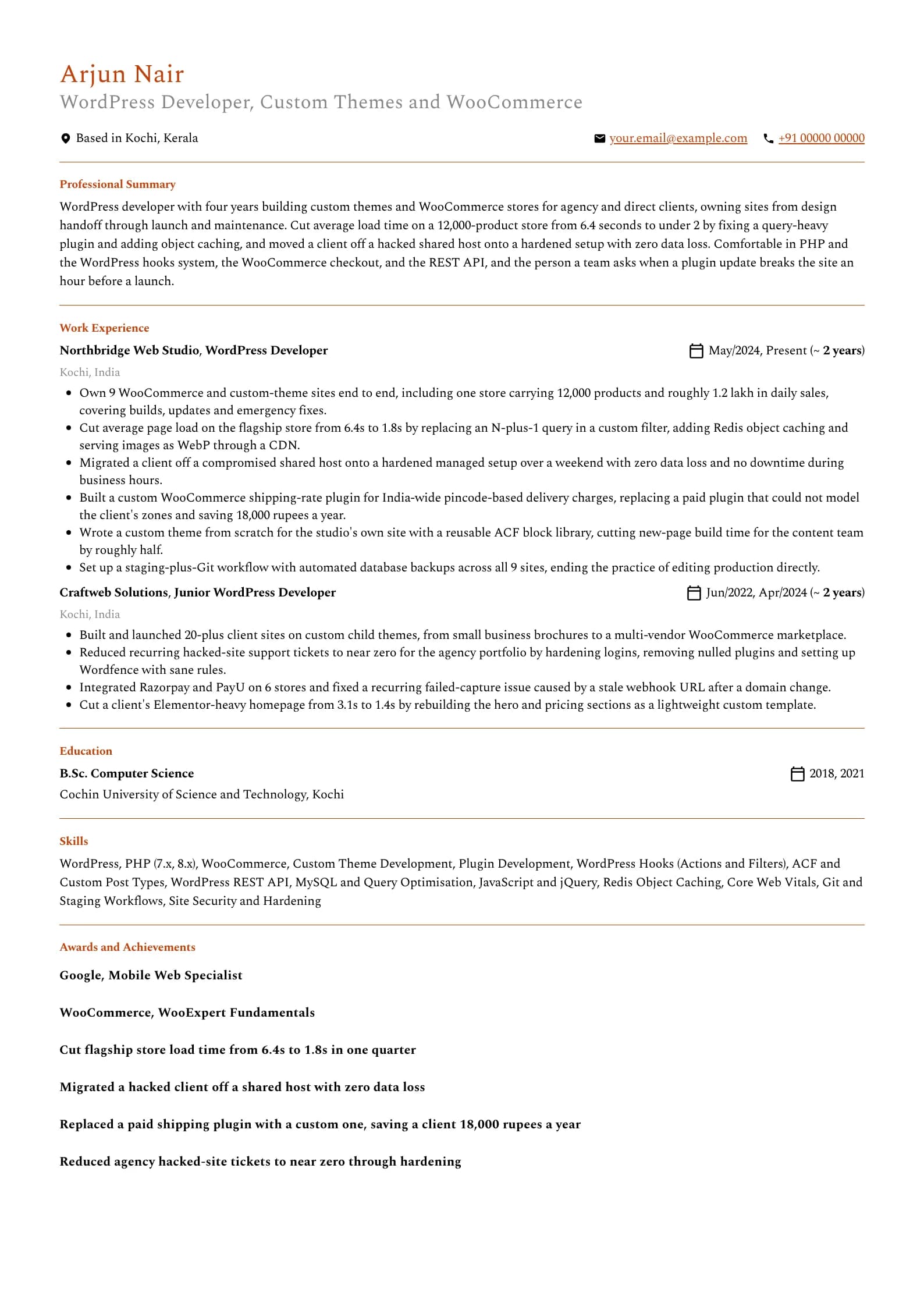
Want this structure with your own details? Build it in the resume builder.
WordPress Developer resume example, Senior (8 years)
header-band template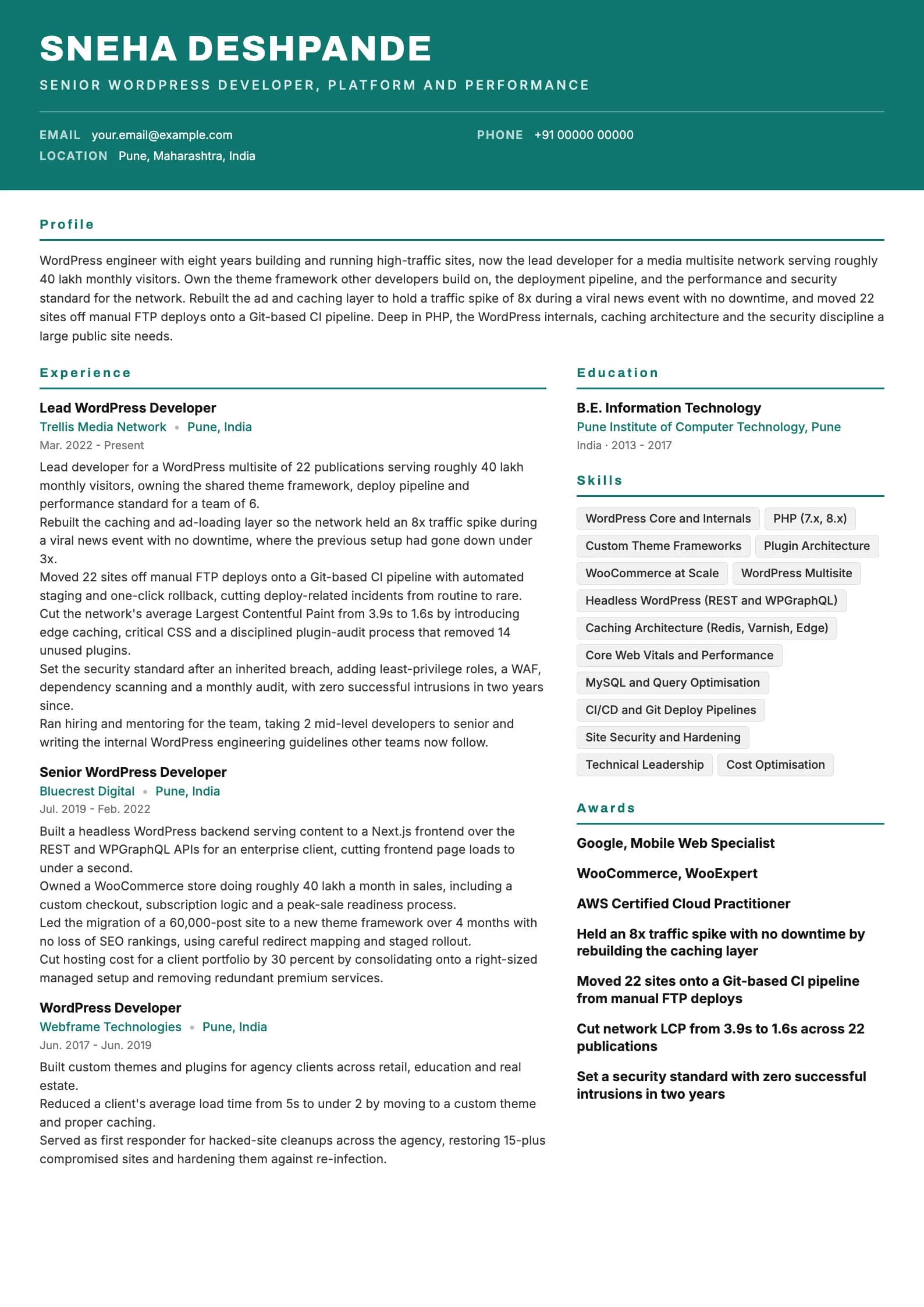
The format that works for WordPress developer resumes in India
Reverse chronological is the layout to use. Most recent role first, work backwards, dates in plain view. A functional resume that hides everything under a Skills heading and drops the dates reads as an attempt to conceal a gap, and reviewers treat it that way. WordPress developers often come through non-linear paths, freelancing, agency hopping, a stint of pure Elementor work, and an honest one-line explanation beats a layout that looks evasive. Length follows evidence. One page covers a fresher and most developers up to roughly six years. Past that, a second page is fine when it carries real platform, security or performance work, not a longer plugin list. A page two built from a hobbies line and a list of every theme you have ever touched is a padded one-page resume. Four things belong nowhere on a WordPress developer resume: a photograph, date of birth, marital status and father's name. They survive from an older campus template and add nothing to a technical screen. Every line they occupy is a line a shipped site or a speed number could have used. Link your portfolio and, if it is clean, your public code. A WordPress developer with no live URLs on the page is asking the reviewer to take the whole resume on trust. Two or three live sites you built, with a one-line note on what was custom about each, are worth more than any adjective. Send a PDF unless the posting asks otherwise, name the file with your own name and the target role, and keep to a single column so a parser does not read a sidebar into the middle of your experience. The table below sets out the section order.
| Section | Where it goes | Why |
|---|---|---|
| Name and headline | Top, above everything | The headline is the role you want, WordPress or PHP developer. Recruiters match on it. |
| Professional summary | Directly under the header | Three lines. Stack, years, and the single strongest result, usually speed, sales or security. |
| Portfolio links | In the header or just under the summary | Live URLs of sites you built. A WordPress resume without them is missing its evidence. |
| Work experience | Next, for anyone with a job | Most recent first. Newest role gets the most bullets. |
| Projects | Above experience for freshers, below it after that | For a fresher this is the evidence. Show custom work, not installed plugins. |
| Skills | Below experience | Grouped: WordPress core, PHP, WooCommerce, tools. Not a 40-plugin wall. |
| Education and certifications | Bottom, unless you are a fresher | Degree, institution, years. WooExpert and the Google specialist badges earn a line. |
Installing plugins is not the same as building software
The single most common WordPress resume failure is a page that reads Elementor, Divi, WPBakery, Yoast, WP Rocket, Contact Form 7, WooCommerce, Wordfence, and never once shows a line of code you wrote. It describes someone who can assemble a site from the plugin directory, which is a real and useful skill, but it is not what a developer job pays for. The moment a plugin breaks, a client needs custom logic, or a page has to be fast, the person who only configures plugins is stuck, and a reviewer knows it. The fix is to prove the code. If you write custom theme development, a bullet should describe a theme you built from a design rather than bought. If you write plugin development, name the plugin you wrote and what it did that no existing plugin could. The mid-level sample lists a custom WooCommerce shipping plugin precisely because a bullet shows it replacing a paid plugin the client had outgrown. That single line does more than a full column of plugin names. Be specific about PHP. WordPress is PHP, and a developer who can say they write PHP against the hooks system, understand actions and filters, and can read the WooCommerce checkout is worth more than one who treats WordPress as a no-code tool. Mention the WordPress REST API, WP-CLI, or WPGraphQL if you have used them, because they separate a developer from a site builder. Do not lean the whole resume on page builders. Elementor and Divi belong on the page if the target role uses them, but if every bullet is a page-builder task, the resume reads as a configurator, not a developer, and it will lose to a candidate who can show custom code.
For every tool on your page, ask: did I configure it or did I write code around it. Configuration is fine to mention, but at least half your bullets should show custom PHP, a theme you built, or a plugin you wrote. That is the difference the job is paying for.
Writing a summary a hiring manager actually reads
The block under your name is the part you can be reasonably sure gets read, so it should carry three facts: what you build in WordPress, how long you have been doing it, and the strongest thing that happened because of your work, usually a speed number, a sales figure or a security save. Three or four lines, no adjectives that cannot be checked. The old objective line, seeking a challenging position to utilise my WordPress and web development skills, tells the reader nothing they did not already assume. Replace it with a summary. An objective describes what you want, a summary describes what you have already shipped, and only one is evidence. Freshers often think they have nothing to summarise. Look at the fresher sample: it names the four sites shipped, the WooCommerce store, the PageSpeed jump, and the habit of using staging. That is a genuine summary built from one internship and side projects. What it avoids is "passionate web developer", a phrase so common it now carries no information. A practical test: read your summary and ask whether any WordPress user with Elementor could paste it onto their resume unchanged. If they could, it describes the tool, not you. Add the specific store, the specific number and the specific custom work until it stops being transferable.
Professional summary, mid-level developer
Weak
Passionate and dedicated WordPress developer with 4+ years of experience in WordPress, Elementor, WooCommerce and web development seeking a challenging role in a reputed company.
Strong
WordPress developer with four years building custom themes and WooCommerce stores, owning sites from design handoff to maintenance. Cut a 12,000-product store's load time from 6.4s to 1.8s and migrated a hacked client off a shared host with zero data loss.
The rewrite trades a tool list and self-description for a scope, a verifiable speed number and a real recovery.
Experience bullets: verb, site, consequence
Every strong bullet in the samples follows the same shape. It opens with an action verb, names the specific site or thing you built, and closes with what measurably moved. The verb establishes that you did it. The site tells a reviewer whether the work is relevant. The number does the persuading. Start with the outcome and work backwards. WordPress developers usually write the task first, then struggle to attach a number, which produces bullets like "worked on various client websites using WordPress and improved their performance". Instead ask what was different after you shipped: a page is faster, a store took more orders, a hacked site came back, a client stopped paying for a plugin, a build got quicker. Then write the sentence that ends in that fact. Vary the metric. WordPress work has an unusually rich set of honest numbers: PageSpeed and Core Web Vitals scores, load time, conversion or sales figures, hosting cost saved, plugins removed, sites migrated, downtime avoided during a sale. Three PageSpeed numbers in a row read as one trick, so reach across the set. Where you lack a number, give scope: how many sites, how many products, how large a migration, how much traffic. "Migrated a 60,000-post site to a new theme with no loss of SEO rankings" carries weight without inventing a percentage. Allocate bullets by recency. Current role gets five or six, the previous role four or five, anything older two or three.
| Level | What bullets must prove | Typical metric |
|---|---|---|
| Fresher | You can build and launch a real site in WordPress | PageSpeed improvement, sites shipped, a payment flow that worked |
| 1 to 3 years | You write custom code, not only configure plugins | Load time, custom plugin or theme built, hacked site recovered |
| 4 to 6 years | You own sites end to end, including performance and security | Sales, Core Web Vitals, hosting cost saved, migrations |
| 7 years and up | You set the platform, pipeline and standards teams build on | Traffic held, sites on CI, network LCP, intrusions prevented |
Experience bullet, agency role
Weak
Responsible for developing and maintaining various WordPress websites for clients using different themes and plugins.
Strong
Cut average page load on a 12,000-product WooCommerce store from 6.4s to 1.8s by fixing an N-plus-1 query, adding Redis object caching and serving images as WebP.
"Responsible for" describes a job posting; the rewrite names the store, the before and after, and the three techniques a reviewer can ask about.
Experience bullet, security work
Weak
Handled website security and fixed hacked sites for various clients whenever required.
Strong
Migrated a client off a compromised shared host onto a hardened managed setup over a weekend with zero data loss and no downtime during business hours.
Turns a vague duty into one specific rescue with a clear, checkable outcome.
If a bullet would read identically on the resume of anyone who has used WordPress, it is describing the tool, not you. Rewrite it until it only fits the site you actually built.
The skills section: grouped, honest, and short enough to defend
A WordPress resume's skills section has two audiences with opposite preferences. The parser wants literal terms it can match, WooCommerce and PHP and REST API. A human wants a short, organised list that signals what kind of developer you are, a coder or a configurator. Grouping satisfies both. Group by function rather than one long line. WordPress core and PHP, e-commerce, frontend, and tools and workflow is a grouping that works for almost every WordPress developer. The exact headings matter less than the fact that structure exists. Write names the way the industry writes them: WooCommerce not Woo Commerce, PHP not Php, ACF spelled out once as Advanced Custom Fields. A parser matches on strings. Twelve to sixteen skills is the working range. Below eight the section looks thin. Above twenty it stops being a signal, and WordPress resumes are especially prone to plugin padding: listing Yoast, Rank Math, WP Rocket, Contact Form 7, Elementor, Divi and WPBakery as seven separate skills when none of them is a developer skill. A parser will match them, but a human reads the wall and downgrades you to a site builder. Do not include a proficiency bar. Star ratings invite an argument you cannot win, and nobody agrees on what four stars in PHP means. Let the experience prove the depth instead.
| Group | What goes in it | How many |
|---|---|---|
| WordPress and PHP | WordPress core, PHP, hooks, custom themes, plugin development, REST API | 4 to 6 |
| E-commerce | WooCommerce, payment gateways (Razorpay, PayU), subscriptions | 2 to 3 |
| Frontend | HTML, CSS, JavaScript, jQuery, responsive design, Core Web Vitals | 3 to 4 |
| Data and performance | MySQL, query optimisation, caching (Redis, Varnish), CDN | 2 to 3 |
| Tools and workflow | Git, WP-CLI, staging, security hardening, CI deploy | 2 to 4 |
Skills section
Weak
Skills: WordPress, Elementor, Divi, WPBakery, Yoast, Rank Math, WP Rocket, Contact Form 7, WooCommerce, Wordfence, Slider Revolution, Gravity Forms, HTML, CSS, MS Office, Photoshop, Canva
Strong
WordPress and PHP: WordPress core, PHP, custom themes, plugin development, REST API. E-commerce: WooCommerce, Razorpay. Frontend: HTML, CSS, JavaScript, Core Web Vitals. Data: MySQL, Redis caching. Tools: Git, WP-CLI, security hardening.
Cuts the plugin-name padding, promotes the actual developer skills, and groups the rest so a human reads it in one pass and sees a coder, not a configurator.
Projects and portfolio: what to include and how to describe it
For a WordPress developer, the portfolio is not optional. This is a role where live URLs are the strongest evidence you have, because a reviewer can open a site and see the work in ten seconds. For a fresher, projects sit above experience and get the most space. For an experienced developer they move below experience and shrink to a couple of entries, kept only when they show something the day job does not. The common failure is describing the stack instead of the software. "A website built using WordPress and Elementor with a contact form" tells a reviewer nothing, because thousands of resumes carry that exact line. Describe what was custom, who uses the site, and what was genuinely hard. The NGO donation site in the fresher sample is a stronger entry than a prettier brochure site, because it names a real payment integration and a real database total, not a bought template. Pick projects that show range rather than three brochure sites. One with a custom theme built from a design, one that handles money or data through WooCommerce or a custom form, and one that proves a coding skill such as a custom plugin or a Gutenberg block, is a stronger set than three variations of the same page-builder layout. Two well-described projects with live links beat five listed by name. If the site is live, link it in plain text. If the code is public and clean, link that too, because an interviewer who opens a repository reads the commit history as a work sample. A public plugin, even a small one, is worth more than a paragraph of claims, because it is code a stranger can inspect.
Project description, fresher resume
Weak
NGO Website: a website built using WordPress and Elementor for a non-profit organisation with a donation button and contact form.
Strong
NGO donation site: a custom child theme with a Razorpay-integrated donation form, a live total that updates from the database and 80G receipt emails, which handled roughly 200 donations without a failed capture.
Swaps a page-builder mention for a real payment integration, live data and a checkable outcome, which is what marks a developer rather than a user.
Where education and certifications belong
Education goes at the bottom for anyone with a full-time job, and near the top for a fresher, who has nothing stronger to lead with. Degree, institution, years. That is the whole entry for most people. WordPress hires more non-computer-science graduates than most tech roles, so if your degree is unrelated, do not over-explain it. Let the portfolio and the projects carry the weight, which they will. CGPA or percentage is worth keeping while you are a fresher and it is good, roughly 70 percent and above, because early-career screening still filters on it. Once you have your first full-time role, drop it. A number from three years ago competes for space with live sites that are far more predictive. Certifications sit just below education, or beside skills if you hold only one or two. WordPress has fewer heavyweight certifications than most stacks, so the ones that exist matter more when they fit: the WooCommerce WooExpert track, the Google Mobile Web Specialist, and a hosting-specific badge such as a Kinsta or WP Engine partner credential if the target role runs on that platform. A general web development certificate from freeCodeCamp or Udemy is a fine signal for a fresher and near-invisible for a senior, so weight the list to your stage. An expired certification listed as current is a small dishonesty that is easy to catch, so renew it or remove it.
Getting through the applicant tracking system
An applicant tracking system is a parser and a search index, not a judge. It reads your file, tries to break it into name, dates, employers, titles and skills, and stores the result so a recruiter can search across candidates. Almost every ATS problem is a parsing problem, and parsing problems come from layout, not wording. The layout rules are short. One column. Standard section headings, so use Work Experience rather than My Journey, and Skills rather than My Toolbox. No text inside images, so a strip of client logos reads as empty space to a parser. No critical information in the header or footer region, which some parsers drop. Avoid text boxes and nested tables in the resume body. On wording, mirror the language of the job description where it is honest. If the posting says WooCommerce, write WooCommerce. If it says PHP, write PHP rather than only WordPress, because a role that specifies PHP is filtering for coders. Include the expansion alongside an acronym at least once, for example "ACF (Advanced Custom Fields)", so both searches find you. Keyword stuffing does not work, and WordPress resumes are a common offender with a hidden block of every plugin name in white text. Recruiters find it quickly, and the outcome is worse than being filtered. Write real bullets that naturally contain the right terms, because a bullet describing a WooCommerce checkout you built contains the word WooCommerce in a context that survives human review too. Save as PDF from a tool that embeds real text, then open the file and confirm you can select and copy a sentence. If you cannot select the text, neither can the parser.
Section heading
Weak
My WordPress Adventures
Strong
Work Experience
Parsers look for standard headings; a creative one can push the entire block into an unclassified bucket the recruiter never searches.
Test your own file before you send it. Copy the text out of the PDF into a plain text editor. Whatever you can read there is roughly what the parser sees, and anything scrambled is a real risk.
What gets WordPress developer resumes rejected
Most rejections at the resume stage are not close calls. They come from a small set of recurring problems, and all of them are fixable in an afternoon. The list below covers what reviewers of Indian WordPress developer resumes see most often, in rough order of how much damage each one does.
- A page-builder and plugin list with no bullet showing custom code, which reads as a site configurator applying for a developer job.
- No portfolio links. A WordPress developer with no live URLs is asking to be taken entirely on trust, and most reviewers will not.
- Job duties copied from the posting instead of what you shipped. "Responsible for developing websites" is the tell.
- No numbers anywhere. Page speed, sales, hosting cost, sites migrated, downtime avoided. Pick whichever is honest for the work.
- Listing nulled or pirated premium plugins, which flags both a security risk and a legal one to any serious employer.
- A photo, date of birth, marital status or father's name, none of which belongs on a technical resume and each of which takes a project's space.
- No PHP anywhere, so a role that wants a coder cannot tell whether you can write anything beyond page-builder configuration.
- A generic objective line. Replace it with a summary that states stack, years and one result.
- Claiming security or performance expertise with no example, when one specific hacked-site recovery or one PageSpeed number would prove it.
- Typos in the tools you claim to know. Writing "WooCommerce" as "Woocomerce" or "Elementor" as "Elemantor" undoes an otherwise strong page.
Open every portfolio link on your resume before you send it. A dead link, a site that now looks nothing like your work, or one that throws a PHP error is worse than no link at all.
Skills to put on a wordpress developer resume
Technical
- WordPress Core and Internals
- PHP (7.x, 8.x)
- Custom Theme Development
- Plugin Development
- WordPress Hooks (Actions and Filters)
- WooCommerce
- WordPress REST API
- ACF and Custom Post Types
- Gutenberg Block Development
- MySQL and Query Optimisation
- JavaScript and jQuery
- HTML and CSS
- Core Web Vitals and Performance
- Caching (Redis, Varnish, Edge)
Tools and platforms
- Git
- WP-CLI
- Elementor
- Advanced Custom Fields
- WooCommerce
- Razorpay and PayU
- Wordfence
- phpMyAdmin
- WP Engine and Cloudways
- Cloudflare CDN
- Local by Flywheel
- VS Code
Working skills
- Client communication
- Requirement gathering
- Project handover and documentation
- Estimation and scoping
- Debugging under deadline
- Working from designs (Figma)
- Maintenance and support discipline
- Cross-functional collaboration
Certifications worth listing as a wordpress developer
| Certification | Full name | Worth it for |
|---|---|---|
| WooExpert | WooCommerce WooExpert Certification | The most role-specific credential a WordPress developer can hold, worth it if your work centres on WooCommerce stores. Signals real e-commerce depth to agencies and product teams that sell through Woo. Less relevant if you build content and brochure sites rather than stores. |
| Google Mobile Web Specialist | Google Developers Mobile Web Specialist Certification | A performance and frontend credential worth it for WordPress developers who are judged on Core Web Vitals and mobile speed, which is most of them. Pairs well with a resume that already carries PageSpeed numbers, since it backs the claim with a recognised badge. |
| freeCodeCamp Web Design | freeCodeCamp Responsive Web Design Certification | A solid entry signal for a fresher or career switcher proving HTML, CSS and responsive fundamentals. Free and hands-on, so it carries some weight early on. Redundant once you have shipped live client sites, so drop it after your first role. |
| WP Engine or Kinsta Partner | Managed Host Developer or Agency Partner Credential | Worth it when the target role or agency runs on a specific managed host and values developers who know that platform's deploy, staging and caching tooling. A niche but real signal for a specialist. Skip it if the employer is host-agnostic. |
| PHP Certification | Zend or W3Schools PHP Certification | Useful for a WordPress developer who wants to prove PHP as a language rather than only as WordPress glue, especially when applying to teams that treat WordPress as a serious PHP codebase. Most valuable for developers moving from site building toward heavier custom development. |
Keywords an ATS scans for in a wordpress developer resume
These are the literal terms a parser matches against the job description. Use the ones that are true of you, in the sentences where you did the work, not as a list at the bottom.
- wordpress developer
- php developer
- custom theme development
- plugin development
- woocommerce
- wordpress rest api
- advanced custom fields
- elementor
- gutenberg
- core web vitals
- page speed
- mysql
- javascript
- jquery
- responsive design
- site migration
- website security
- caching
- git
- razorpay
WordPress Developer resume FAQ
What salary can a WordPress developer expect in India?
A fresher typically starts around 2.4 to 4.5 LPA at agencies, with product teams and good startups paying more for someone who can write real PHP rather than only use page builders. A WordPress developer with four to six years building custom themes and WooCommerce stores usually sits in the 6 to 12 LPA band. Senior and lead developers owning platforms, performance and security commonly earn 14 to 26 LPA and more at product companies. Strong PHP, WooCommerce depth and a track record on speed and security push the top of every band upward, and skilled freelancers often out-earn salaried peers.
How long should a WordPress developer resume be?
One page up to about six years, two pages after that only if the second page carries real platform, performance or security work rather than a longer plugin list. Nobody has been rejected for a resume that was too easy to read. If you are struggling to fit one page, cut the oldest role to a single line, drop the plugin names that are not developer skills, and let your portfolio links carry the sites you cannot list in full.
Do I really need to code, or is Elementor enough?
For a WordPress developer job, coding is what the title pays for. Elementor and other page builders are fine to know and worth listing, but a resume built entirely on them reads as a site configurator, not a developer, and it will lose to a candidate who can show custom PHP, a theme built from a design or a plugin they wrote. At least half your bullets should show custom code. Pure page-builder skill points you toward web designer or site builder roles rather than developer ones.
Should a WordPress developer include a portfolio link?
Yes, and it is close to mandatory. This is a role where a reviewer can open a live site and judge your work in seconds, so a resume with no URLs throws away your best evidence. Link two or three sites you built, add a one-line note on what was custom about each, and if your code is public and clean, link that too. Open every link before you send the resume, because a dead link or a site that no longer looks like your work is worse than none.
Should I list every plugin I have used as a skill?
No. Listing Yoast, WP Rocket, Contact Form 7, Elementor, Divi and a dozen others as separate skills is padding that marks you as a configurator. Plugins are tools you use, not skills you have. List the developer skills, PHP, custom themes, plugin development, WooCommerce and the REST API, and mention only the few plugins genuinely relevant to the target role. The skills line should read like a coder wrote it, not like a plugin directory.
How do I show performance and security work on my resume?
With specific before-and-after facts. For performance, name the PageSpeed or Core Web Vitals number you moved and the techniques you used, such as lazy loading, WebP images, object caching or removing a heavy plugin. For security, describe one concrete recovery or hardening job, such as migrating a client off a compromised host with no data loss, rather than claiming security expertise in the abstract. One checkable example beats a paragraph of adjectives.
Does an ATS reject WordPress resumes with two columns?
It does not reject them outright, but some parsers read multi-column layouts out of order, which interleaves your sidebar with your experience and produces nonsense in the recruiter's view. A single-column layout removes the risk, which is why all three samples above use one. Test your own file by copying the text out of the PDF into a plain text editor, and if it reads in order there it will most likely parse correctly.
How do I write a WordPress resume with no work experience?
Lead with projects, then education, then skills, and put your portfolio links high on the page. Treat each project as a job: what the site does, who uses it, what you built that was custom, and what changed because it exists. A custom theme from a design counts, a WooCommerce store with a real payment flow counts, and a small plugin you published counts and is often the strongest item. Add anything checkable, such as live URLs, a public repository or a Google or freeCodeCamp certificate, since verifiable work carries more weight than adjectives.
Do certifications help a WordPress developer?
They help most when you have little professional experience or a specific specialism to signal, and least once you have a portfolio of live sites to point at. The WooCommerce WooExpert track and the Google Mobile Web Specialist are the most role-relevant. A freeCodeCamp or Udemy certificate is a fine entry signal for a fresher. For senior roles, shipped platforms, performance numbers and a clean security record matter far more than any badge, so keep the list short and let the work be the credential.
Related resume examples and guides
Build your own in any of these formats
Start from a blank resume or upload the one you have. Goodspace renders it in 24 templates and flags the PHP, WooCommerce and Core Web Vitals keywords an applicant tracking system will look for, and the plugin-name padding it will not credit.
Build my resume