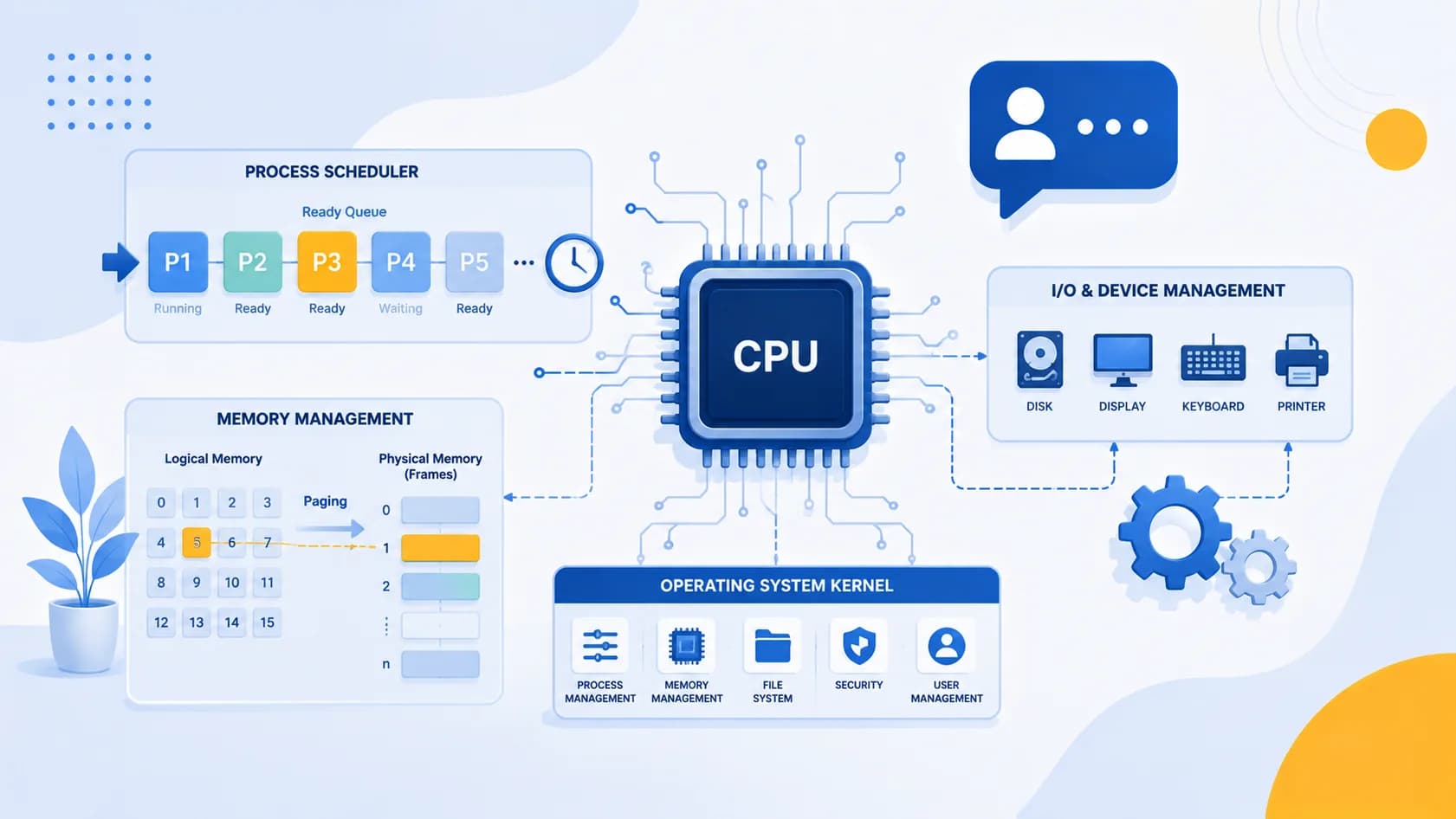
Operating system interview questions are a fixed part of almost every campus placement round and off-campus technical screen in India. Whether you are sitting for a service company like TCS, Infosys, Wipro, or Cognizant, or preparing for a product company such as Amazon, Microsoft, or a funded startup, the interviewer will almost always test your grip on core computer science fundamentals, and operating systems sit right at the top of that list alongside DBMS and computer networks. This guide collects the most frequently asked operating system interview questions, groups them by topic, and gives you concise, correct answers with small worked examples for the numerical parts. It covers both freshers and experienced candidates so you can revise in a single sitting before your interview.
The questions here are ordered the way an interview usually flows: first the basics, then processes and threads, then scheduling, deadlocks, memory management, page replacement, synchronization, file systems, and interprocess communication. Read the answer, then try to explain it out loud in your own words. Interviewers care far more about whether you understand a concept than whether you can recite a textbook definition.
Operating System Basics and Types
1. What is an operating system and why do we need one? An operating system is system software that acts as an intermediary between the user or application programs and the computer hardware. It manages resources such as the CPU, memory, storage, and I/O devices, and provides a convenient environment to run programs. Without an OS you would have poor resource management, no file system, no user interface, and no easy way for multiple programs to share hardware safely.
2. What are the main functions of an operating system? Process management, memory management, file and storage management, device and I/O management, security and protection, and providing a user interface. It also handles error detection and resource allocation.
3. What are the different types of operating systems? Batch OS, multiprogrammed OS, time-sharing OS, distributed OS, real-time OS (RTOS), network OS, and mobile OS. Batch systems group similar jobs, time-sharing systems rapidly switch the CPU between users to create the illusion of simultaneous access, and real-time systems guarantee responses within strict time limits.
4. What is the difference between multiprogramming, multitasking, and multiprocessing? Multiprogramming keeps several jobs in memory so the CPU is never idle. Multitasking is a logical extension of multiprogramming where a single CPU switches rapidly between tasks to give each user interactive response. Multiprocessing uses two or more physical CPUs to execute multiple processes truly simultaneously.
5. What is a kernel? How is it different from the OS? The kernel is the core component of the operating system that manages memory, the CPU, and device communication and runs in a privileged mode. The OS is the broader package that includes the kernel plus system utilities, libraries, and a user interface.
6. What are the types of kernels? Monolithic (all services in one address space, fast but large), microkernel (minimal core with services in user space, more modular and stable), hybrid (a mix, like Windows NT), nanokernel, and exokernel.
7. What is a system call? Give examples.
A system call is the programmatic way a user program requests a service from the kernel, such as fork(), read(), write(), open(), and exec(). It switches the CPU from user mode to kernel mode so privileged operations can run safely.
8. What is the difference between user mode and kernel mode? In user mode a program has restricted access and cannot directly touch hardware or critical memory. In kernel mode the code has full access to all instructions and hardware. The switch happens through system calls, interrupts, or exceptions.
9. What is a bootstrap program? It is the initial program that runs when a computer is powered on. Stored in ROM or firmware, it runs diagnostics, initializes hardware, and loads the operating system kernel into main memory.
10. What is spooling? Spooling stands for Simultaneous Peripheral Operations On-Line. It buffers data for a slow device such as a printer in a queue on disk so that the CPU does not wait for the device, improving overall throughput.
Program vs Process, Processes vs Threads
11. What is the difference between a program and a process? A program is a passive set of instructions stored on disk. A process is a program in execution, an active entity with a program counter, registers, stack, heap, and its own state in memory.
12. What are the sections of a process in memory? Four sections: text (the compiled code), data (global and static variables), heap (dynamically allocated memory), and stack (local variables and function call frames).
13. What is a thread? A thread is the smallest unit of execution within a process, often called a lightweight process. Threads within the same process share the code, data, and heap but each has its own stack, registers, and program counter.
14. What is the difference between a process and a thread?
| Aspect | Process | Thread |
|---|---|---|
| Weight | Heavyweight | Lightweight |
| Memory | Separate address space | Shares address space with peer threads |
| Communication | Needs IPC, slower | Direct via shared memory, faster |
| Context switch | Expensive (full memory switch) | Cheap (registers and stack only) |
| Fault isolation | One process crash does not kill others | One thread crash can bring down the process |
15. What is a context switch? Saving the state (registers, program counter, memory maps) of the currently running process and loading the saved state of the next process so the CPU can switch between them. It is pure overhead, so we try to minimize it.
16. What is the difference between user-level and kernel-level threads? User-level threads are managed by a thread library in user space and are fast to create but the kernel is unaware of them, so one blocking call can block the whole process. Kernel-level threads are managed by the OS, are slower to create, but can be scheduled independently across CPUs.
17. What are the benefits of multithreading? Better responsiveness, resource sharing within a process, economy compared to creating full processes, and true parallelism on multiprocessor systems.
18. What is a zombie process?
A process that has completed execution but still has an entry in the process table because its parent has not yet read its exit status using wait(). It holds no resources except the table entry.
19. What is an orphan process? A process whose parent has terminated while the child is still running. In Unix-like systems, orphans are adopted by the init (or systemd) process, which reaps them.
Process States and Process Scheduling
20. What are the different states of a process? New (being created), Ready (waiting for CPU), Running (instructions executing), Waiting or Blocked (waiting for I/O or an event), and Terminated (finished). Movement between these states is managed by the scheduler and dispatcher.
21. What is the difference between the scheduler and the dispatcher? The scheduler is the policy component that decides which process runs next. The dispatcher is the mechanism that actually gives control of the CPU to that process, performing the context switch and the jump to the correct location. The time this takes is called dispatch latency.
22. What are the types of schedulers? Long-term scheduler (controls the degree of multiprogramming by admitting jobs), short-term or CPU scheduler (selects the next process to run, runs very frequently), and medium-term scheduler (handles swapping processes in and out of memory).
23. What is the difference between preemptive and non-preemptive scheduling? In preemptive scheduling the OS can interrupt a running process and move it back to the ready queue, for example when a higher-priority process arrives or a time quantum expires. In non-preemptive scheduling a process keeps the CPU until it finishes or voluntarily blocks. Preemptive scheduling gives better response times but adds context-switch overhead and possible starvation.
24. What is starvation and how is it solved? Starvation is when a low-priority process waits indefinitely because higher-priority processes keep arriving. The common solution is aging, which gradually increases the priority of a process the longer it waits, so it eventually runs.
CPU Scheduling Algorithms with Worked Examples
25. What are the common CPU scheduling algorithms? First Come First Serve (FCFS), Shortest Job First (SJF), Shortest Remaining Time First (SRTF), Priority scheduling, Round Robin (RR), and Multilevel Queue and Multilevel Feedback Queue.
Here is a quick comparison interviewers like to hear:
| Algorithm | Preemptive? | Key idea | Main drawback |
|---|---|---|---|
| FCFS | No | Runs in arrival order | Convoy effect, long average wait |
| SJF | No | Shortest burst first | Needs burst prediction, starvation |
| SRTF | Yes | Preemptive SJF | Starvation, high overhead |
| Round Robin | Yes | Fixed time quantum, cyclic | Quantum choice is critical |
| Priority | Both | Highest priority first | Starvation, solved by aging |
26. Solve an FCFS scheduling problem. Take three processes arriving at time 0 in the order P1, P2, P3 with burst times 24, 3, and 3.
- Gantt chart: P1 (0 to 24), P2 (24 to 27), P3 (27 to 30).
- Waiting times: P1 = 0, P2 = 24, P3 = 27.
- Average waiting time = (0 + 24 + 27) / 3 = 17.
This shows the convoy effect: one long job forces short jobs to wait, pushing the average up.
27. Solve the same set with Shortest Job First. Reorder by burst: P2 (0 to 3), P3 (3 to 6), P1 (6 to 30).
- Waiting times: P2 = 0, P3 = 3, P1 = 6.
- Average waiting time = (0 + 3 + 6) / 3 = 3.
SJF gives the minimum possible average waiting time, which is why it is provably optimal, but it needs knowledge of burst lengths that we usually have to estimate.
28. Solve a Round Robin problem. Processes P1, P2, P3 with bursts 24, 3, 3, all at time 0, time quantum = 4.
- Gantt: P1 (0-4), P2 (4-7), P3 (7-10), then P1 runs the remaining 20 units in five more quanta (10-14, 14-18, 18-22, 22-26, 26-30).
- Turnaround: P1 = 30, P2 = 7, P3 = 10.
- Waiting time = turnaround minus burst: P1 = 6, P2 = 4, P3 = 7. Average = 17/3 ≈ 5.67.
A small quantum improves response time but increases context switches; a large quantum degenerates into FCFS.
29. How does Priority scheduling work and where is it used? Each process is assigned a priority number and the CPU goes to the highest priority ready process. It can be preemptive or non-preemptive. Its main problem is starvation of low-priority processes, fixed by aging. Turnaround time is the total time from arrival to completion; waiting time is turnaround time minus CPU burst time. Being able to compute these on the whiteboard is exactly the kind of thing that trips people up, so practicing them under time pressure with a tool like the Goodspace AI Mock Interview helps you get the numbers right when it counts.
Deadlocks: Conditions, Prevention, Avoidance
30. What is a deadlock? A deadlock is a situation where two or more processes are each waiting for a resource held by another, so none of them can ever proceed.
31. What are the four necessary conditions for a deadlock? All four must hold simultaneously:
- Mutual exclusion: at least one resource is non-shareable.
- Hold and wait: a process holds one resource while waiting for another.
- No preemption: resources cannot be forcibly taken away.
- Circular wait: a closed chain of processes each waiting for the next.
32. What is the difference between deadlock prevention, avoidance, detection, and recovery? Prevention breaks at least one of the four necessary conditions in advance. Avoidance uses runtime information to make sure the system never enters an unsafe state, as in the Banker's algorithm. Detection allows deadlocks to occur then finds them using a resource allocation graph or wait-for graph. Recovery resolves a detected deadlock by terminating processes or preempting resources.
33. How can each deadlock condition be prevented? Attack mutual exclusion by making resources shareable where possible; attack hold and wait by requiring a process to request all resources at once; attack no preemption by allowing resources to be taken back; attack circular wait by imposing a global ordering on resource requests.
34. What is the Banker's algorithm? It is a deadlock avoidance algorithm. Each process declares its maximum need in advance. Before granting a request, the system simulates the allocation and checks whether a safe sequence still exists in which every process can finish. If a safe sequence exists the request is granted; otherwise the process waits.
35. Give a small safe-state example for the Banker's algorithm. Suppose total instances of a single resource = 10, and three processes have (allocated, max): P1 (2, 7), P2 (3, 5), P3 (2, 9). Available = 10 - (2 + 3 + 2) = 3. Need = max minus allocated: P1 = 5, P2 = 2, P3 = 7. With 3 available, P2 (need 2) can finish and release 3, giving 5 available; then P1 (need 5) finishes and releases 7, giving 7 available; then P3 (need 7) finishes. A safe sequence P2, P1, P3 exists, so the state is safe.
36. What is a resource allocation graph? A directed graph with process and resource nodes. A request edge goes from a process to a resource; an assignment edge goes from a resource to a process. If the graph has no cycle there is no deadlock; with single instances per resource, a cycle means deadlock.
Memory Management: Paging, Segmentation, Virtual Memory
37. What is the difference between logical and physical addresses? A logical (virtual) address is generated by the CPU. A physical address is the actual location in main memory. The Memory Management Unit (MMU) translates logical addresses to physical addresses at runtime.
38. What is paging? Paging is a non-contiguous memory allocation scheme that divides logical memory into fixed-size pages and physical memory into equal-size frames. A page table maps each page to a frame, eliminating external fragmentation.
39. What is segmentation? Segmentation divides the process into logical, variable-size segments such as code, stack, and data, matching the programmer's view. Each segment has a base and a limit stored in a segment table.
40. What is the difference between paging and segmentation?
| Aspect | Paging | Segmentation |
|---|---|---|
| Block size | Fixed | Variable |
| Programmer view | Invisible | Visible, logical units |
| Fragmentation | Internal | External |
| Table | Page table | Segment table |
| Address | Page number + offset | Segment number + offset |
41. What is internal vs external fragmentation? Internal fragmentation is wasted space inside an allocated block, common in paging when a page is not fully used. External fragmentation is free memory scattered in small non-contiguous holes between allocations, common in segmentation and variable partitioning.
42. What is virtual memory? Virtual memory is a technique that lets a process use an address space larger than physical RAM by keeping only the active parts in memory and the rest on disk. It increases the degree of multiprogramming and removes the need to fit an entire process in memory at once.
43. What is demand paging? A page is loaded into memory only when it is actually referenced, triggering a page fault that the OS handles by fetching the page from disk. This avoids loading pages that are never used.
44. What is thrashing? Thrashing occurs when a system spends more time swapping pages in and out than executing useful work, because processes do not have enough frames to hold their working set. It is controlled with the working-set model or by reducing the degree of multiprogramming.
45. What is the TLB? The Translation Lookaside Buffer is a small, fast associative cache that stores recent virtual-to-physical page translations, so most memory accesses skip the full page-table walk and run much faster.
46. What is the effective access time formula for demand paging? Effective access time = (1 - p) × memory access time + p × page fault service time, where p is the page fault rate. Because page fault service time is huge compared to memory access, even a tiny p hurts performance significantly.
Page Replacement Algorithms with Worked Examples
47. What are the main page replacement algorithms? FIFO (evict the oldest page), LRU (evict the least recently used page), and Optimal (evict the page that will not be used for the longest time in the future).
48. Work through FIFO page replacement. Reference string: 7, 0, 1, 2, 0, 3, 0, 4 with 3 frames.
- 7 -> fault [7], 0 -> fault [7,0], 1 -> fault [7,0,1]
- 2 -> fault, evict 7 [0,1,2]; 0 -> hit
- 3 -> fault, evict 1 [0,2,3]? Order matters: oldest is 0, so evict 0 [1,2,3]... using strict FIFO order the queue is 2,0,1 after step 4 to 5. To keep it simple, FIFO evicts the page loaded earliest.
- Counting the first six references (7,0,1,2,0,3): faults at 7,0,1,2,3 = 5 faults, 1 hit at 0.
The teaching point is that FIFO ignores how often a page is used and can suffer Belady's anomaly.
49. What is Belady's anomaly? Belady's anomaly is the counterintuitive situation where increasing the number of frames increases the number of page faults, which can happen with FIFO. Stack-based algorithms like LRU and Optimal never suffer from it.
50. Work through LRU on the same string. Reference string 7, 0, 1, 2, 0, 3, 0, 4 with 3 frames. LRU evicts the page unused for the longest time.
- 7,0,1 fill the frames (3 faults).
- 2 -> fault, least recently used is 7, evict 7 [0,1,2].
- 0 -> hit (0 becomes most recent).
- 3 -> fault, least recently used is 1, evict 1 [0,2,3].
- 0 -> hit.
- 4 -> fault, least recently used is 2, evict 2 [0,3,4].
Total faults on this trace = 6, hits = 2. LRU tracks recency and usually beats FIFO on real workloads.
51. What is the Optimal page replacement algorithm? Optimal replaces the page that will be used farthest in the future. It gives the lowest possible fault count and is used as a theoretical benchmark, but it cannot be implemented in practice because it needs knowledge of future references.
52. What is locality of reference? Programs tend to access a small set of pages repeatedly over a short time (temporal locality) and access nearby addresses (spatial locality). This is why caching and demand paging work well.
Process Synchronization
53. What is a critical section? A critical section is a part of code where a process accesses a shared resource. Only one process should execute in its critical section at a time to avoid race conditions.
54. What are the three requirements for a critical section solution? Mutual exclusion (only one process inside at a time), progress (a process not in its critical section cannot block others from entering), and bounded waiting (a process cannot be made to wait indefinitely).
55. What is a race condition? A race condition occurs when the final result depends on the non-deterministic order in which multiple processes or threads access and modify shared data. Proper synchronization removes it.
56. What is a semaphore? A semaphore is an integer variable accessed only through two atomic operations, wait (P, which decrements) and signal (V, which increments). A binary semaphore takes values 0 or 1; a counting semaphore can take any non-negative value to manage multiple identical resources.
57. What is the difference between a mutex and a semaphore?
| Aspect | Mutex | Semaphore |
|---|---|---|
| Value | Binary lock (locked/unlocked) | Integer counter |
| Ownership | Owned by the locking thread | No ownership |
| Use | Mutual exclusion for one resource | Signaling and counting resources |
| Release | Only the owner can unlock | Any process can signal |
58. What is Peterson's solution?
Peterson's solution is a classic software solution for two-process mutual exclusion using two shared variables: a flag array indicating intent and a turn variable to break ties. It satisfies mutual exclusion, progress, and bounded waiting.
59. What is a monitor? A monitor is a high-level synchronization construct that bundles shared data, the procedures that operate on it, and condition variables, ensuring only one process is active inside the monitor at a time. It is easier and safer to use than raw semaphores.
60. What is priority inversion? Priority inversion happens when a high-priority process is blocked waiting for a resource held by a low-priority process. It is solved by priority inheritance, where the low-priority holder temporarily inherits the higher priority until it releases the resource.
File Systems
61. What is a file system? A file system is the method and data structures an OS uses to organize, store, retrieve, and manage files on secondary storage, along with metadata like names, permissions, and timestamps.
62. What are the common file allocation methods? Contiguous allocation (blocks stored together, fast access but external fragmentation), linked allocation (blocks linked by pointers, no fragmentation but slow random access), and indexed allocation (an index block holds pointers to all data blocks, good random access).
63. What is an inode? An inode is a data structure in Unix-like file systems that stores a file's metadata: size, ownership, permissions, timestamps, and pointers to the data blocks. The file name is stored separately in the directory.
64. What is the difference between a hard link and a soft link? A hard link is another directory entry pointing to the same inode, so both names are equal and the data survives until all links are removed. A soft (symbolic) link is a separate file that stores the path to the target; if the target is deleted, the link breaks.
65. What are seek time and rotational latency? Seek time is the time for the disk arm to move to the correct track. Rotational latency is the time for the desired sector to rotate under the read/write head. Together with transfer time they determine disk access time.
66. How does the OS track free disk space? Common methods are a bit vector or bitmap (one bit per block, 0 or 1 for allocated or free), a linked list of free blocks, grouping, and counting.
Interprocess Communication (IPC)
67. What is interprocess communication and why is it needed? IPC is the set of mechanisms that let processes exchange data and coordinate actions. It is needed because processes have separate address spaces and cannot directly read each other's memory.
68. What are the main IPC mechanisms? Pipes and named pipes, message queues, shared memory, semaphores, sockets, and signals. Shared memory is the fastest because processes read and write a common region directly; message passing is easier to program and works across machines.
69. What is a pipe? A pipe is a unidirectional IPC channel that connects the output of one process to the input of another, commonly used between related processes such as a shell command pipeline. Named pipes (FIFOs) allow unrelated processes to communicate.
70. What is the difference between shared memory and message passing? In shared memory, processes share a common memory region and communication is fast but the programmer must handle synchronization. In message passing, the OS moves messages between processes, which is slower but simpler and works well in distributed systems.
71. What are classic IPC and synchronization problems? The producer-consumer (bounded buffer) problem, the readers-writers problem, the dining philosophers problem, and the sleeping barber problem. Each illustrates a different synchronization challenge and is a favourite interview follow-up.
72. What is a socket? A socket is an endpoint for communication defined by an IP address and a port number. Types include stream sockets (TCP, reliable), datagram sockets (UDP, connectionless), and raw sockets. Sockets enable IPC across a network as well as on the same machine.
How to Prepare for Operating System Interview Questions
A structured plan beats last-minute cramming. Here is an approach that works well for Indian placement season and off-campus interviews.
- Build the concept map first. Understand how processes, scheduling, memory, and synchronization connect rather than memorizing isolated definitions. Interviewers love follow-ups that jump across topics.
- Practice numericals by hand. Scheduling (FCFS, SJF, Round Robin), page replacement (FIFO, LRU, Optimal), and the Banker's algorithm come up as whiteboard problems. Solve at least ten of each until the Gantt charts and fault counts are automatic.
- Explain out loud. Being able to describe context switching or deadlock in plain language is what separates a pass from a fail. Record yourself or explain to a friend.
- Revise with comparison tables. Process vs thread, paging vs segmentation, mutex vs semaphore, and preemptive vs non-preemptive scheduling are asked in almost every interview.
- Simulate the real round. Fundamentals questions are usually delivered rapid-fire, so timing and composure matter. A structured mock session such as the Goodspace AI Mock Interview lets you rehearse OS questions under realistic conditions and get feedback on where your explanations are vague.
- Link theory to code. For experienced roles, be ready to discuss how you used threads, locks, or shared memory in real projects, and what concurrency bugs you fixed.
Frequently Asked Questions
Q1. Are operating system questions asked in every placement interview in India? For core software and product roles, yes, very frequently. Service companies test OS along with DBMS, networks, and data structures in the technical round, and product companies weave OS concepts into system design and coding discussions. It is one of the highest-return subjects to revise.
Q2. How much time do I need to prepare operating systems for interviews? If you already studied OS in your semester, one to two weeks of focused revision covering the topics in this guide is usually enough. Start with the concepts, then drill numericals and comparison tables, and finish with mock interviews.
Q3. What are the most important operating system topics for interviews? Process vs thread, CPU scheduling with numericals, deadlocks and the Banker's algorithm, paging and virtual memory, page replacement algorithms, and synchronization with semaphores and mutexes. These five clusters cover the large majority of questions.
Q4. What is the difference between a process and a thread in one line? A process is an independent program in execution with its own memory space, while a thread is a lightweight unit of execution inside a process that shares the process's memory with sibling threads.
Q5. Do I need to write code in an operating systems interview? For freshers it is usually conceptual and numerical. For experienced or product roles you may be asked to write a small snippet using locks or semaphores, reason about a race condition, or discuss concurrency in a system design answer.
Q6. How are OS questions different for experienced candidates? Freshers get definitions and standard numericals. Experienced candidates are asked to apply the concepts: diagnosing thrashing or deadlocks in production, choosing synchronization primitives, reasoning about context-switch overhead, and connecting OS behaviour to real system performance.
Final Word
Operating system interview questions reward understanding over memorization. If you can draw a Gantt chart, walk through a page replacement trace, list the four deadlock conditions, and explain why a mutex is not the same as a semaphore, you are ahead of most candidates. Use this guide as your revision checklist, practice the worked examples until they are second nature, and simulate the pressure of the real round before you sit for it. Do that consistently and the OS section of your interview becomes one of the easiest marks to secure.